
From Lecture Hall to Headphones: How Students Are Replacing Highlighters with AI Audio
Highlighting never taught you anything. Listening might. Discover the complete audio-first student workflow that replaces passive re-reading with active audio learning.
"Highlighting never taught you anything. Listening might."
There is a ritual almost every student knows. You sit down with a textbook chapter. You read through it once. You go back with a highlighter — yellow for key terms, pink for definitions, maybe orange if you are feeling ambitious. You finish the chapter, look at the page covered in color, and feel productive.
Then the exam arrives. And almost none of it stayed.
The problem with highlighting is not laziness. It is neuroscience. Passive re-reading and color-coding text are among the least effective study strategies ever measured by cognitive science research. They create the sensation of learning without triggering the memory consolidation that learning actually requires.
The students replacing highlighters are not studying less. They are studying differently — and the tool at the center of that shift is AI audio. Specifically, a workflow built around converting course materials into listenable audio, listening actively, and using the time recovered from passive reading for thinking instead.
This is a complete guide to that workflow. Every stage of the student day — before lecture, during lecture, after lecture, before the exam — rebuilt around audio with ReadLoudly.
Why Highlighting Fails (And What Actually Works)
In 2013, a landmark review by cognitive psychologists Dunlosky et al. examined ten of the most popular student study techniques and rated each on effectiveness. Highlighting and re-reading were rated low utility — not harmful, but close to a waste of time compared to better alternatives.
The techniques rated high utility were practice testing and distributed practice — repeatedly retrieving information from memory over spaced intervals.
Audio-first studying, when done actively, forces both. Listening without the ability to passively scan ahead demands more engagement per minute than reading. Pausing to recall, summarize, or recite what you just heard is practice testing. Listening to the same content across multiple short sessions on different days is distributed practice.
The highlighter did not fail you. The workflow around it did.
The Audio-First Student Day: A Full Workflow
Here is what a complete student day looks like when audio replaces passive reading — from morning to night. Each stage uses a specific ReadLoudly tool or workflow.
Stage 1 — The Night Before: Prime Your Brain Before the Lecture
Old Way
Ignore the pre-reading. Walk into the lecture cold and try to absorb everything in real time.
Audio Way
Listen to the chapter the night before at 1.5x speed to build familiarity — so the lecture becomes a review session, not a first encounter.
Upload the assigned chapter or reading to ReadLoudly the night before. Listen at 1.5x speed for 20–30 minutes — not to master the material, but to build familiarity. This is called priming — exposing the brain to vocabulary, structure, and key ideas so they arrive in lecture as recognition rather than novelty.
Recognition is cognitively cheap. Processing brand-new information in real time under lecture conditions is expensive. Students who prime the night before consistently report better note quality, better questions, and better retention from the same lecture.
How to do it with ReadLoudly:
- Upload the assigned PDF, EPUB, or DOCX to ReadLoudly's PDF Reader or Text to Speech tool
- Set speed to 1.5x — fast enough to cover the chapter, slow enough for key terms to land
- Listen with headphones during dinner, before sleep, or during any low-demand evening activity
- Do not take notes. Just listen. The goal is exposure, not mastery.
Time investment: 20–30 minutes the evening before. Payoff: the entire lecture becomes a review session.
Stage 2 — The Morning Commute: Review While You Move
Old Way
Scroll through social media on the bus. Arrive at campus having added nothing to your understanding since yesterday.
Audio Way
Resume listening to the same chapter. The commute becomes 20–40 minutes of academic input with zero extra time cost.
Movement and audio are a particularly effective combination. Mild physical activity — walking, cycling, being on a bus — increases cerebral blood flow and has been shown to enhance both attention and memory encoding. The student who listens while walking to campus is not just filling dead time. They are biologically priming their brain for learning.
How to do it with ReadLoudly:
- Open ReadLoudly in your mobile browser — no app install needed
- Resume the document where you left off on your laptop last night
- Use earphones and keep the phone in your pocket — audio only, no screen needed
- Optional: set 1.25x for commute listening if 1.5x feels fast without a screen to follow
ReadLoudly tools: Text to Speech · Mobile browser access · Cross-device sync
Stage 3 — The Lecture: Active Listening, Not Transcription
Old Way
Type or write everything the professor says furiously and highlight the slides PDF afterward — a verbatim transcript you half-understand.
Audio Way
Because you have already heard the material, the lecture is no longer your first exposure. You are filtering — not transcribing.
Your notes become reactions: what surprised you, what contradicted your pre-read understanding, what questions emerged, what the professor emphasized that was not in the chapter. This is called elaborative interrogation — connecting new information to existing knowledge rather than recording it.
During the lecture: Focus on the professor's emphasis, examples, and anything not covered in the pre-read. Mark questions with a "?" and return to them after class. Do not annotate the slides in real time — that is still highlighting in disguise.
After the lecture (same day): Type your sparse notes into a clean text file — 150 to 300 words maximum. Upload that file to Notes to Audio and listen back during your commute home.
Hearing your own compressed summary within hours of the lecture is one of the strongest memory consolidation moves available. It forces encoding twice — once in writing, once in listening — across two different cognitive channels.
Stage 4 — Between Classes: Dead Time Becomes Study Time
Old Way
Sit in the campus café between lectures, check your phone, feel vaguely guilty about the readings you have not started.
Audio Way
Upload a reading for your next class and listen for 15–20 minutes with headphones. No desk, silence, or screen required.
This is one of the most underrated shifts in the audio workflow — the removal of setup friction. Visual reading requires a desk, adequate light, a quiet environment, and sustained focus. Audio requires none of these. The bar to begin a session drops from "I need to find a good spot to sit down and read" to "I need headphones."
For students juggling part-time work, families, or long commutes, reducing setup friction is not a small thing. It is the difference between studying and not studying on a hard day.
How to do it with ReadLoudly:
- Keep your current week's readings saved in your ReadLoudly dashboard
- Open on your phone between classes — even for 15 minutes
- Use chapter navigation to jump to the most relevant section rather than listening from the beginning
- Pause and voice-memo any insight that arrives mid-listen — revisit in your notes later
ReadLoudly tools: PDF Reader · EPUB Reader · Chapter navigation · Mobile browser
Stage 5 — Evening Study: Active Review, Not Passive Re-Reading
Old Way
Re-read highlighted sections. Feel like you are studying. Retain perhaps 10–20% by exam day.
Audio Way
Listen to a compressed version of what you need to know — then close everything and test yourself on it.
The evening session in an audio workflow has two components:
Component A — Listen to compressed material (20 min): Use Notes to Audio to convert your lecture notes and key chapter points into audio. Listen at normal speed, tracking each idea. This is not background listening — this is focused input.
Component B — Active recall without the document (10 min): After listening, close everything. On a blank page, write everything you remember from the session — key arguments, terms, examples, connections. This is the closest student-accessible equivalent to the practice testing that the research identifies as the gold standard for retention.
What you cannot recall after a focused session is exactly what needs more repetition. What you can recall confidently does not. This makes your subsequent sessions more efficient — you spend time on gaps, not on material you already know.
How to do it with ReadLoudly:
- Compress your lecture notes and key chapter points into a short text document
- Upload to Notes to Audio
- Listen once through — focused, no multitasking
- Close everything and free-recall on paper
- Return to ReadLoudly only to check what you missed
Time per subject: 30 minutes. Subjects covered per evening: 2–3. Desk time required: Optional.
Stage 6 — The Scanned Handout Problem
Old Way
The professor hands out a physical worksheet or scanned PDF. Standard TTS tools cannot read it. Back to staring at a screen.
Audio Way
ReadLoudly's built-in OCR extracts text from any scanned or image-based document before reading it aloud. Automatic — no separate tool needed.
Every student has encountered this. The professor hands out a physical worksheet in class, or shares a scanned PDF of a journal article, or photographs a diagram from a textbook. The file is an image — not selectable text. ReadLoudly solves this with built-in OCR. Upload any scanned document to Read Scanned PDF, and ReadLoudly extracts the text before reading it aloud.
How to do it with ReadLoudly:
- Photograph the handout with your phone or scan it
- Upload the image or scanned PDF to ReadLoudly's Scanned PDF Reader
- OCR runs automatically
- Listen immediately — same audio workflow as any other document
A handout that would otherwise take 30 minutes to read visually becomes audio in under 60 seconds of setup.
Stage 7 — The Week Before the Exam: Stack Your Summaries
Old Way
Re-read every highlighted chapter again. Spend 8 hours staring at color-coded pages. Retain less than you expect. Panic.
Audio Way
You built a library of compressed audio summaries all semester. Exam week is a structured listen-through of everything you have already processed.
The exam week audio stack:
| Day | What to listen to | Speed | Time |
|---|---|---|---|
| Day 1 | Weeks 1–3 lecture note summaries | 1.5x | 45 min |
| Day 2 | Weeks 4–6 lecture note summaries | 1.5x | 45 min |
| Day 3 | Weeks 7–9 lecture note summaries | 1.5x | 45 min |
| Day 4 | Weeks 10–12 lecture note summaries | 1.5x | 45 min |
| Day 5 | Full semester — key terms only | 1.75x | 30 min |
| Day 6 | Weakest topics — full chapter audio | 1.0x | 60 min |
| Day 7 | Rest and light review — no new input | — | — |
The total listening time across seven days is roughly 4.5 hours. Compare this to the 15–20 hours a traditional re-reading revision schedule demands — covering the same material at a fraction of the time cost.
The difference is not cutting corners. It is the difference between reviewing material you have encountered three times before versus reading it for the first time under exam pressure and calling it revision.
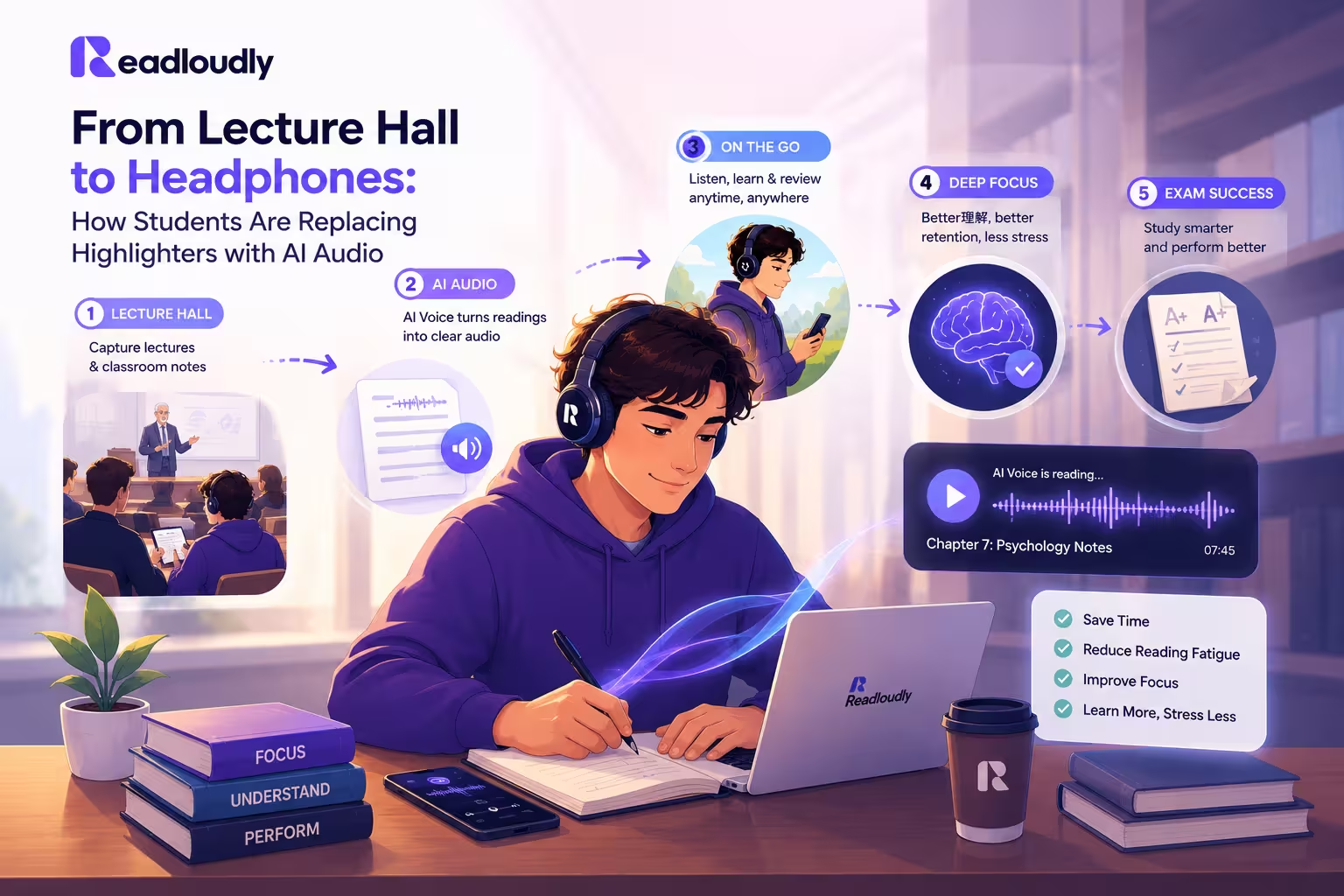
The Tool Stack: What ReadLoudly Replaces in This Workflow
Every stage of the audio workflow above uses one or more ReadLoudly tools. Here is the complete map:
| Workflow Stage | Tool Used | Replaces |
|---|---|---|
| Pre-lecture chapter listen | Text to Speech | Passive reading at a desk |
| Commute review | Mobile browser + PDF Reader | Scrolling social media |
| Post-lecture note audio | Notes to Audio | Re-reading notes the next day |
| eBook textbook listening | EPUB Reader | Staring at a textbook screen |
| Scanned handout reading | Scanned PDF Reader | Manual transcription / skipping it |
| Exam week compressed review | Notes to Audio | Re-reading every chapter |
Common Mistakes Students Make When Switching to Audio
Listening while also browsing your phone or watching something does not constitute a study session. One input, full attention — just as you would give to reading.
Speed listening is a skill that builds gradually. Start at 1.0x for your first week. Forcing 2x too early produces the audio equivalent of skimming — fast, but shallow.
Listening without testing yourself afterward is marginally better than highlighting. The free recall step is non-negotiable if retention is the goal.
The exam week audio stack only works if you built it during the semester. One 200-word text summary per lecture, uploaded to Notes to Audio, takes five minutes.
The workflow covers PDFs, EPUBs, DOCX files, scanned handouts, and typed notes. Most students start with one format and never explore the rest. Check your reading list — it likely includes multiple formats that are all compatible with ReadLoudly.
The Highlighter Is Not the Problem. The Strategy Is.
The highlighter became the dominant student tool because it felt efficient. It required minimal effort, it left a visible mark of progress, and it gave a reliable sense of having done something. All of those qualities made it sticky — and all of them are completely disconnected from actual learning.
Audio-first studying is not easier than highlighting. In some ways it demands more discipline — you cannot passively drift through audio the way you can drift through a page of colored text. But it is dramatically more efficient, more portable, more flexible, and — when paired with active recall — far more effective at putting knowledge where it needs to be when the exam begins.
The students adopting this workflow are not studying more hours. They are getting more out of every hour they have.
ReadLoudly is free to start. Your next lecture notes are waiting.
The highlighter showed you where the important parts were. Audio makes sure they actually stay.