
AI Study Tools for Students: Turn Any Document into a Study Set.
Upload one PDF, Word file, or EPUB and ReadLoudly Study Hub builds a complete study set from it — a chapter-by-chapter tutor lesson, multiple choice quizzes, flashcards, fill in the blanks, a written test, clean notes, and a two-host audio podcast. Everything is generated from your own material, so you revise what your course actually covers.
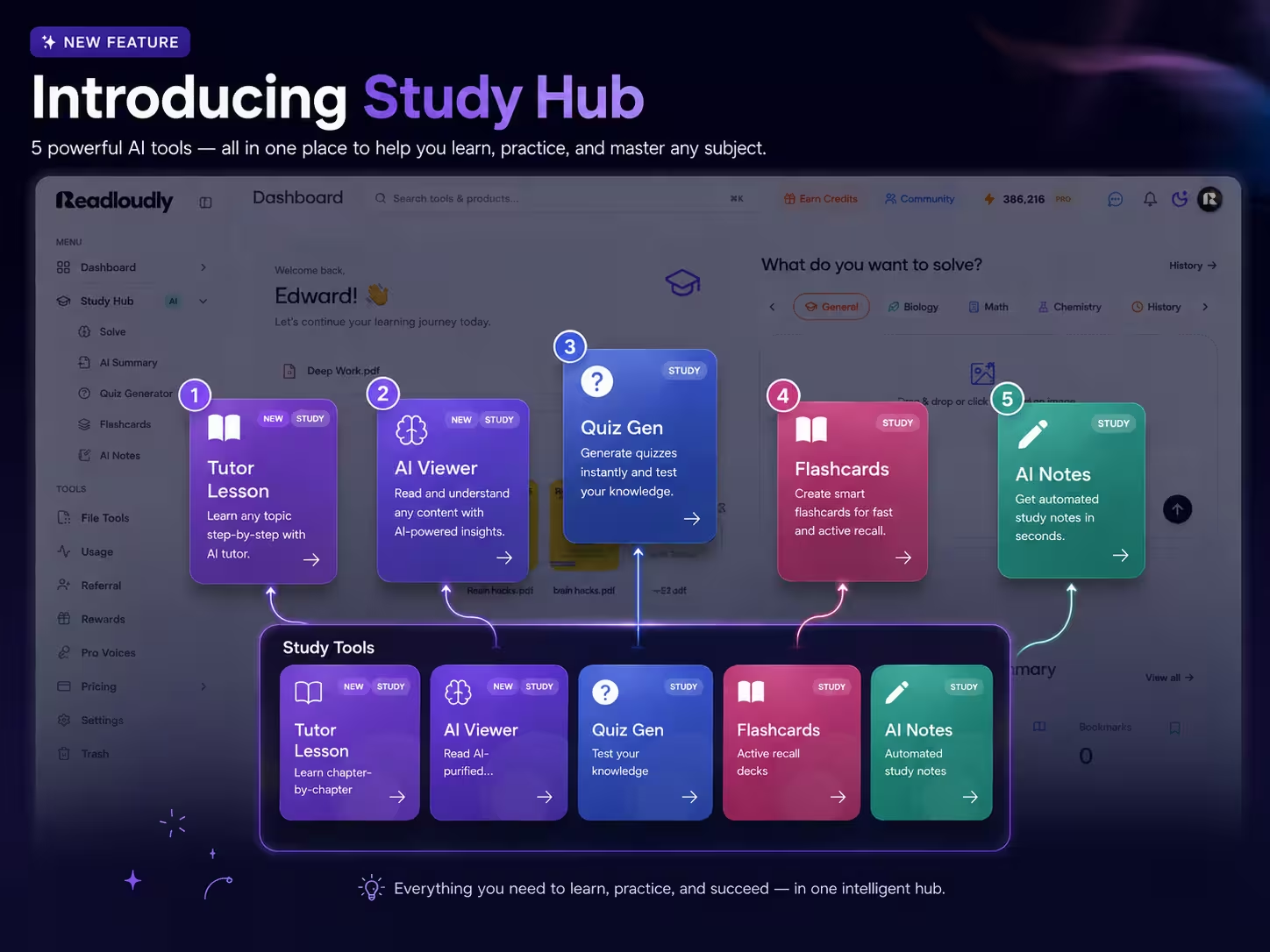
Study-hub-strategy.pdf
Study set ready · 7 tools generated
Why Study Sets Work
Stop Re-Reading. Start Practising.
Highlighting a chapter feels productive but rarely sticks. A study set turns the same chapter into questions you have to answer, cards you have to recall, and audio you can revise with anywhere.
One Upload, Seven Tools
A single PDF, DOCX, or EPUB becomes a tutor lesson, quiz, flashcard deck, cloze test, written exam, notes, and a podcast — no copy-pasting between apps.
Built on Active Recall
Every tool asks you to produce the answer instead of recognising it — multiple choice, blanks, flashcards, and long-form written responses that get scored with feedback.
Made From Your Syllabus
Nothing is generic. Questions, definitions, and summaries are pulled from the exact chapters your lecturer set, so revision time maps to what is actually examined.
Document to Study Set
Upload a Chapter, Get a Full Revision Kit
Study Hub reads your document, breaks it into structured content, and prepares the tools you choose. Textbook chapters, lecture handouts, past papers, and class notes all work the same way.
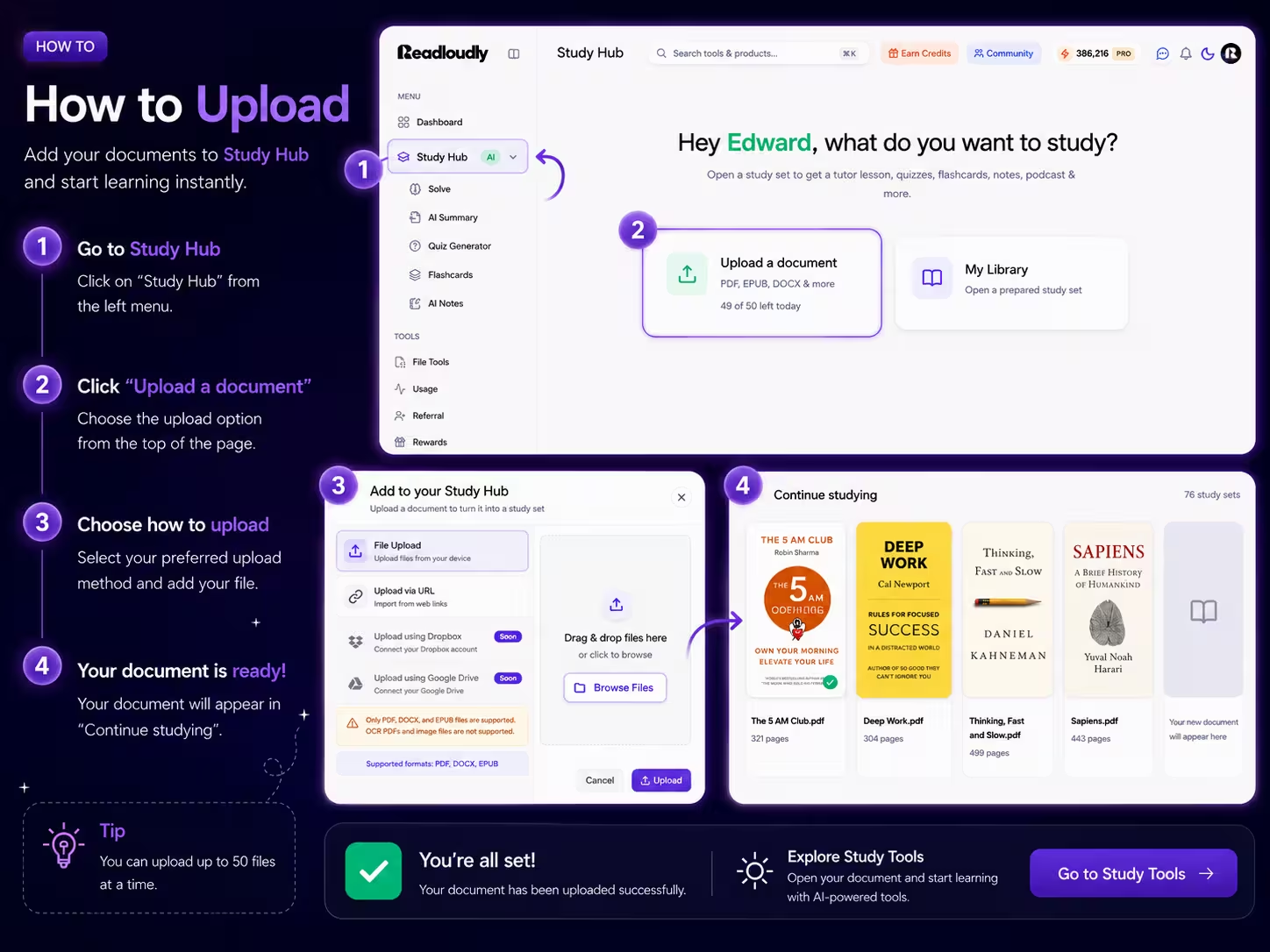
Your Material In. A Study Set
Out.
Drag a file in from your device, Google Drive, Dropbox, or a URL. Study Hub extracts the text, splits it into chapters, and keeps your original document open beside every tool so you can always check the source.
Inside a Study Set
Seven AI Study Tools, One Document
Pick the tools you want before you generate, or add more later. Each one reads the same source material, so a definition you meet in the tutor lesson is the definition you are tested on in the quiz.
Tutor Lesson
Your document rewritten as a guided lesson, chapter by chapter, with key points pulled out and a natural AI voice that reads it aloud while you follow along. Choose a beginner, intermediate, or advanced explanation level to match how new the topic is to you.
Multiple Choice
Chapter-based practice questions with instant feedback and an explanation for every answer. Generate 5 to 20 questions at a time and rebuild the set whenever you want a fresh attempt at the same chapter.
Flashcards
Term and concept cards you flip with a click or the space bar. Ideal for definitions, formulas, dates, and vocabulary — the material that rewards short, repeated review sessions rather than one long sitting.
Fill in the Blanks
Cloze questions built from key sentences in your text, with hints you can switch on or off. Harder than multiple choice because there is nothing to recognise — you have to produce the missing term yourself.
Written Test
Open-ended exam-style questions you answer in full prose. Each response is scored out of five with written feedback, so you can see whether your argument was complete before an examiner does.
Notes
Clean, high-yield notes generated as a short summary, a detailed write-up, or a bullet outline. They are fully editable, so you can add your own lecture points and keep one document per topic.
Podcast
Your chapter turned into a two-host audio conversation with a live transcript. Pick the tone — Casual Chat, Deep Dive, News Style, or Storytelling — choose both voices, and download it for the commute.
Content
The original document, page by page, alongside whichever tool is open. Zoom, jump to a page, or download it — the source is never more than a glance away when an answer needs checking.
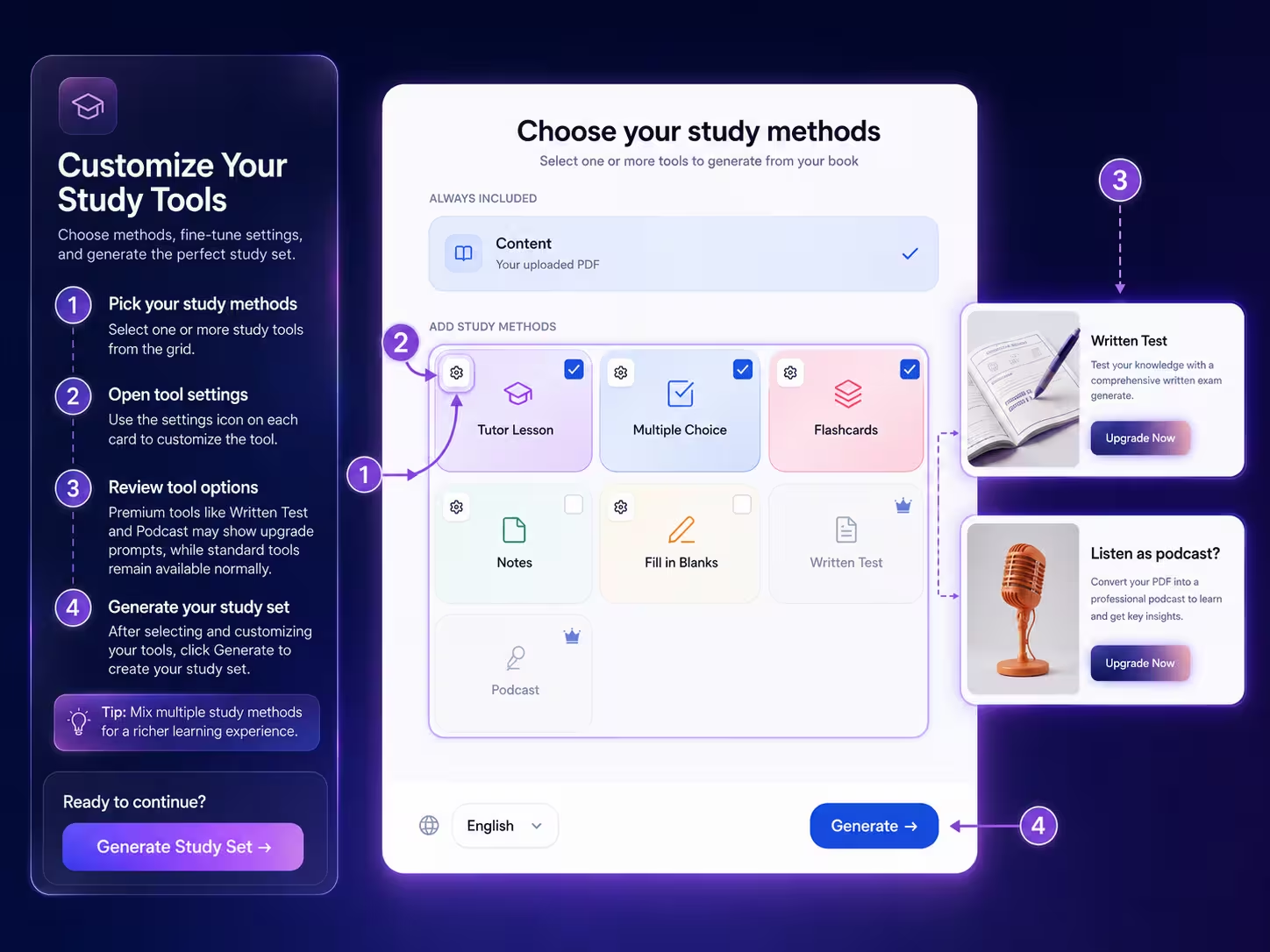
Written Test and Podcast are available on paid plans. Every other tool, including the tutor lesson, is available on the free plan.
You Decide What Gets
Generated.
Before anything is built, you pick the tools and tune them. Set how many questions you want, whether hints appear, how detailed the notes should be, and which language the whole set is generated in.
-
1
Tick the tools you want
Generate one tool or all of them. You can come back and add another to the same study set at any time.
-
2
Tune each one
5 to 20 quiz questions or flashcards, hints on or off for blanks, summary, detailed or bullet notes, and a beginner to advanced tutor level.
-
3
Regenerate when you want a fresh set
Quizzes, flashcards, blanks, and written tests can be rebuilt on paid plans, so a second pass at the same chapter is never the same paper twice.
A Look Inside
What Each Study Tool Looks Like
Same sidebar, same document, different way of working with it. Switch tools without losing your place.
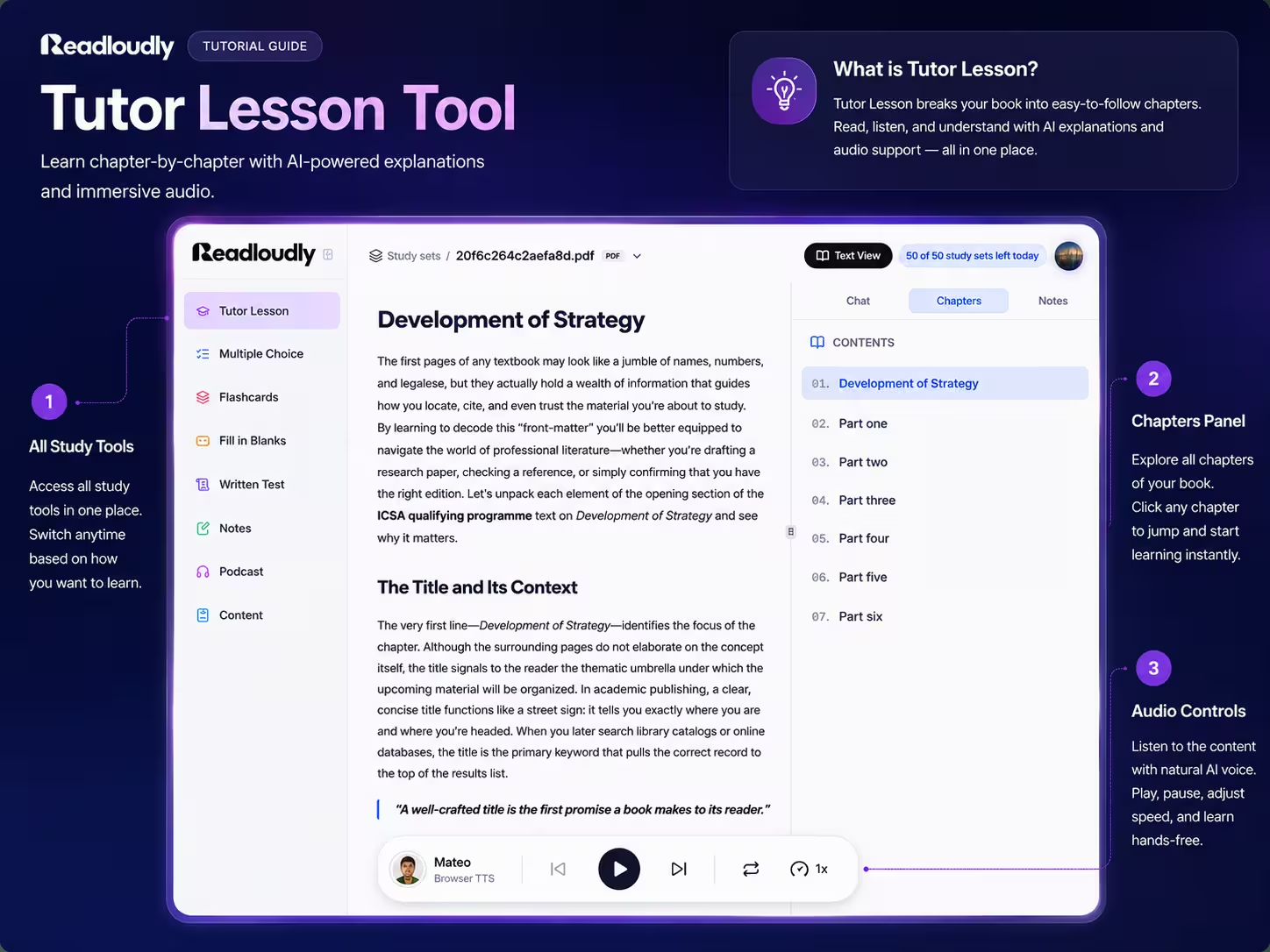
Tutor Lesson
Chapter-by-chapter explanations with a chapters panel, an AI chat beside the text, and audio controls so you can listen instead of read.
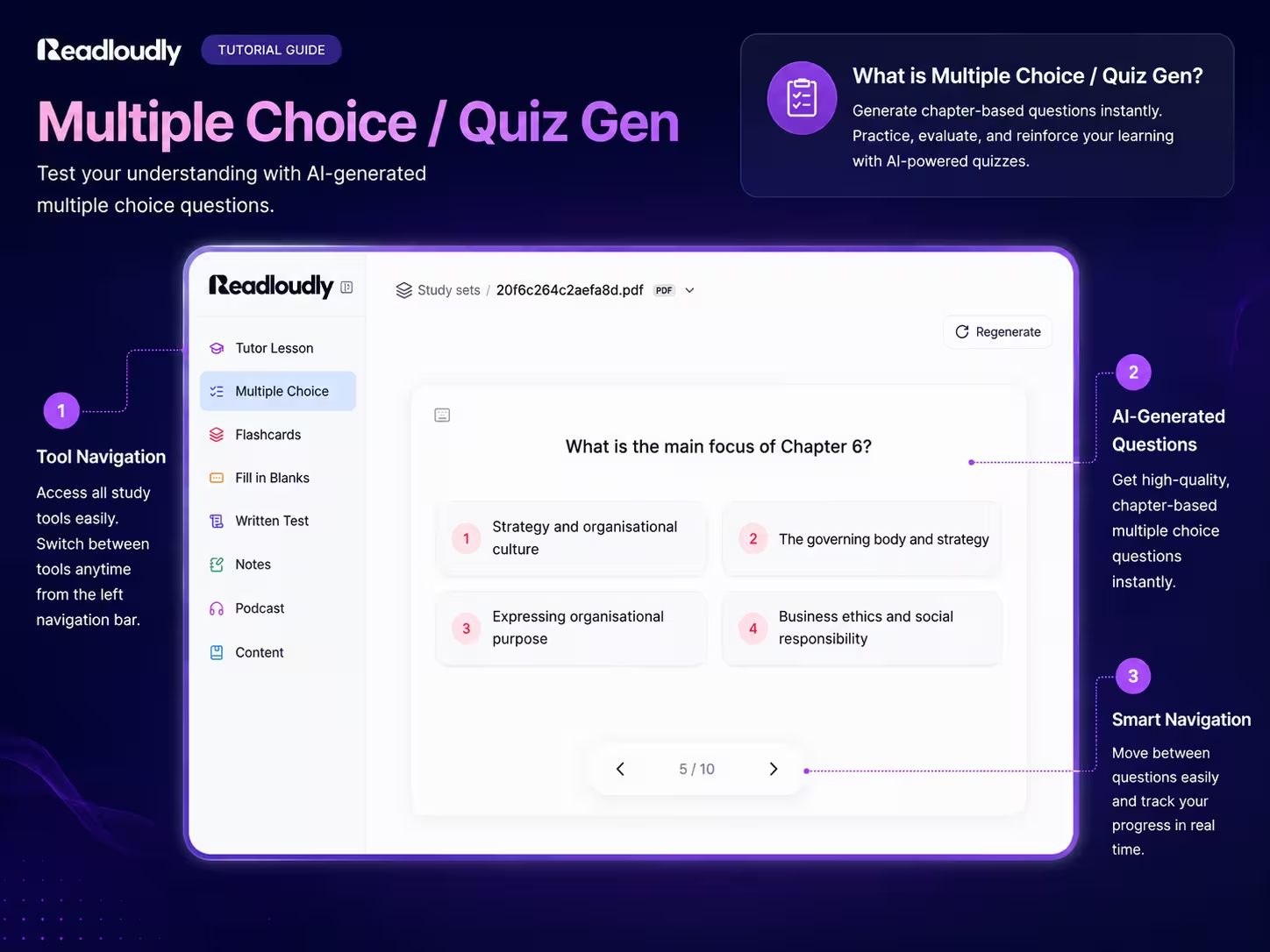
Multiple Choice
Chapter-based questions with four options each, progress tracking, and a regenerate button when you want a new attempt.
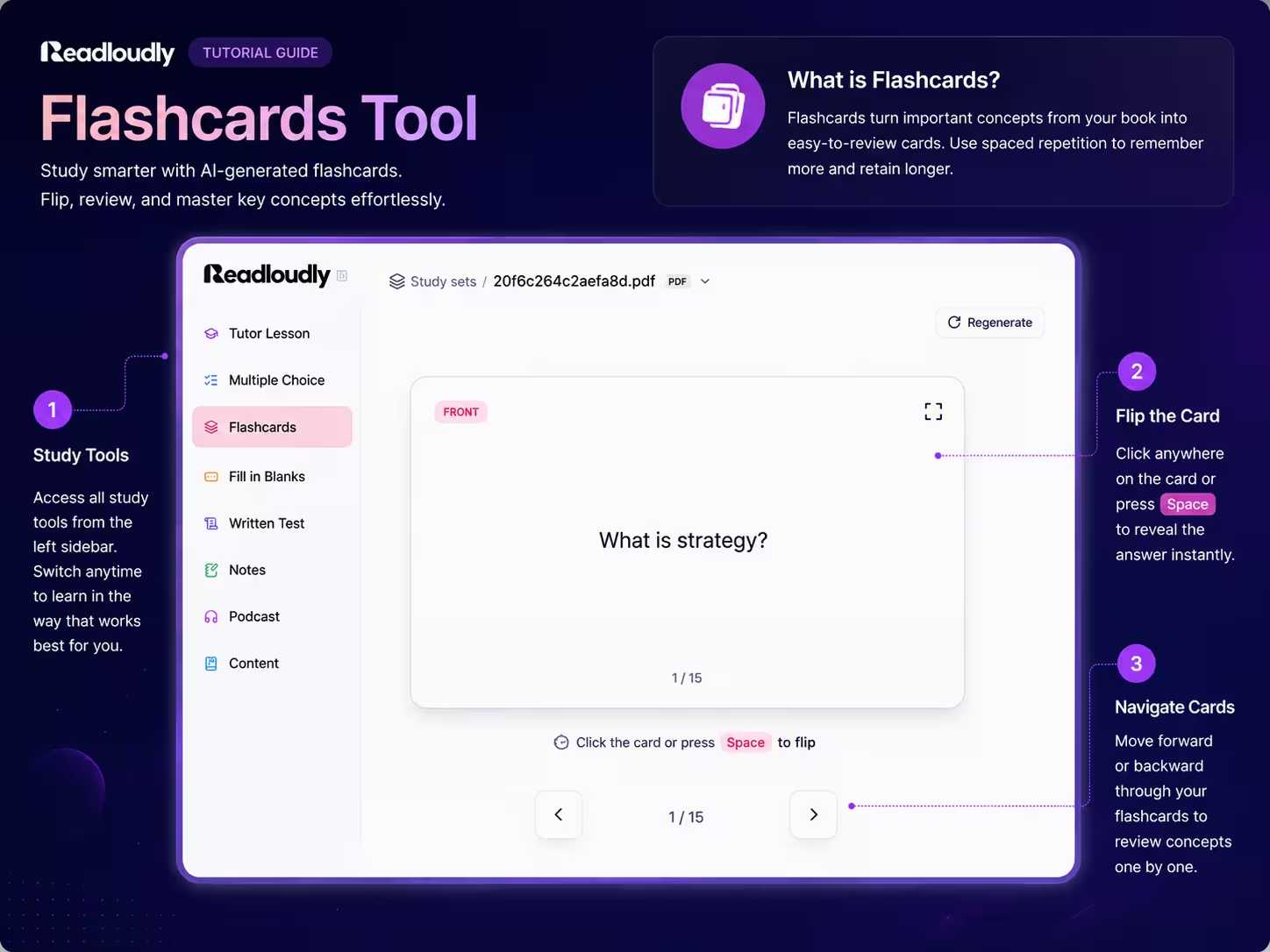
Flashcards
Front and back cards you flip with a click or the space bar, with next and previous navigation through the whole deck.
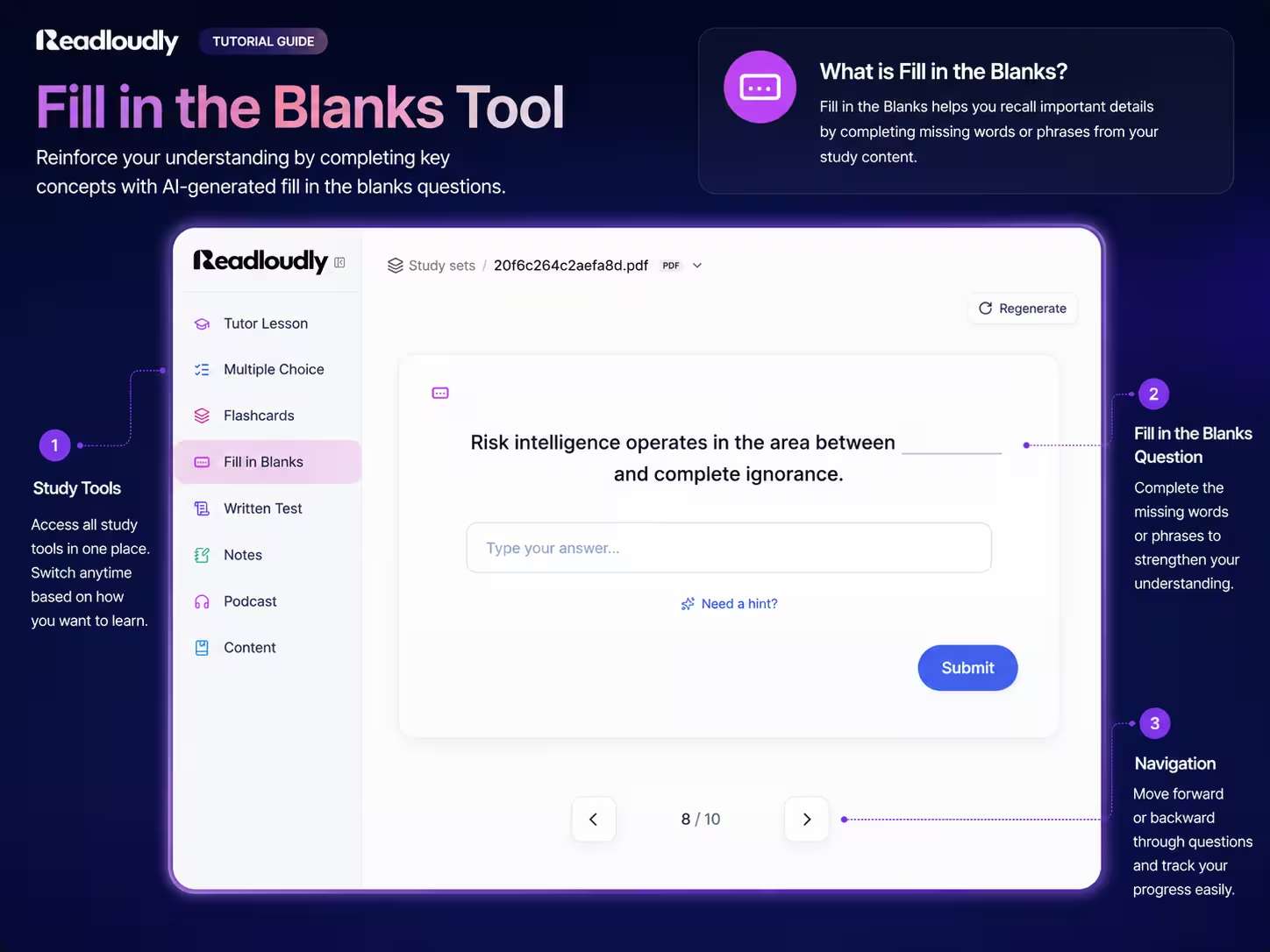
Fill in the Blanks
Key sentences with a missing term, an answer box, and an optional hint when a question stalls your revision.
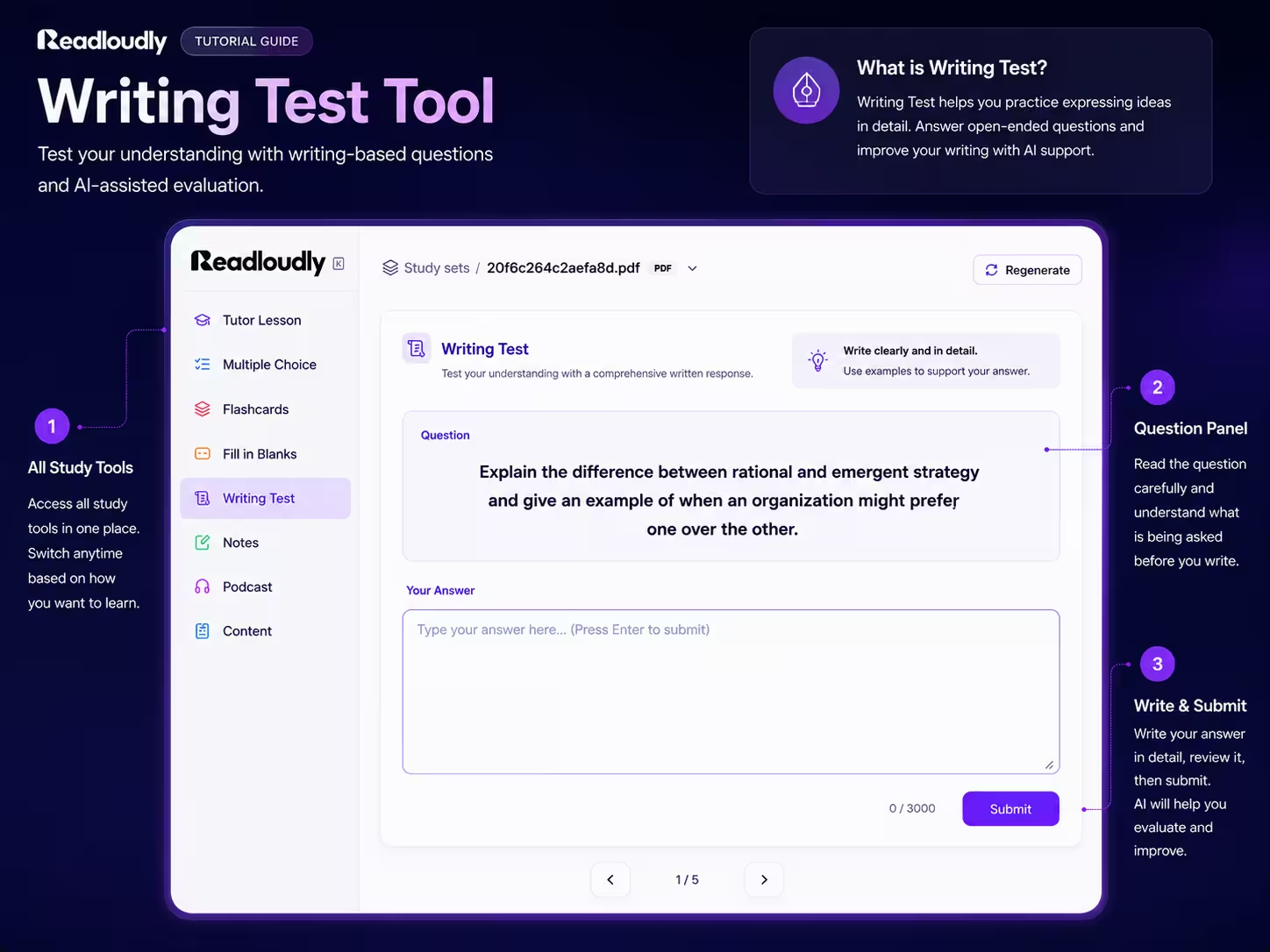
Written Test
Long-form exam questions with a full answer editor, then an AI score and written feedback on what your answer missed.
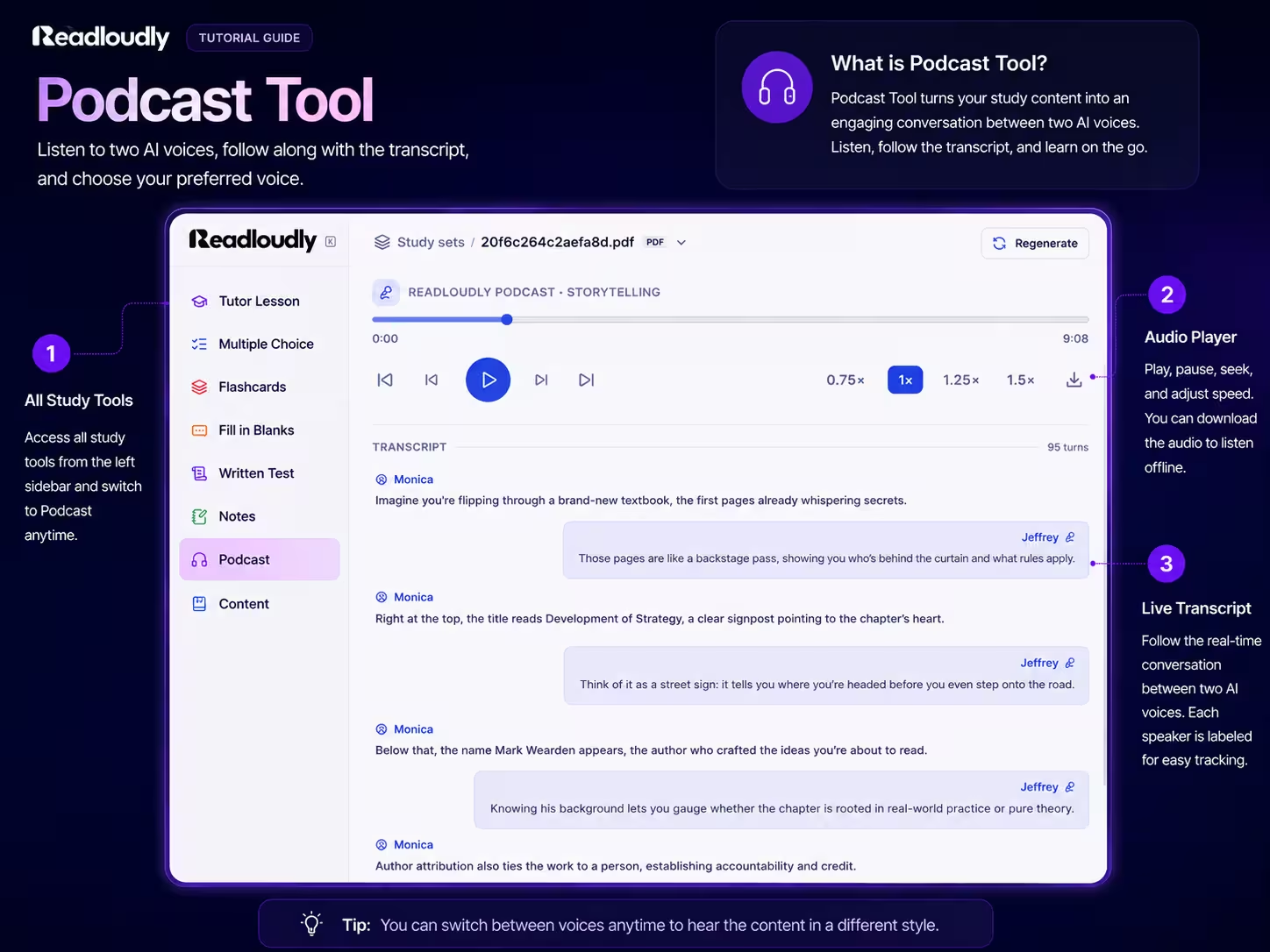
Podcast
A two-voice discussion of your chapter with a live transcript, speed controls from 0.75x to 1.5x, and an offline download.
Use Cases
How Students Actually Use Study Sets
Turn a Chapter into a Quiz the Same Night
Finish the reading, generate ten multiple choice questions from it, and find out immediately which sections did not land — while the material is still fresh enough to fix.
Build a Flashcard Deck for Every Module
One deck per chapter across the term, ready for five-minute reviews between lectures. Definitions, formulas, and key names stay warm instead of being relearned in exam week.
Rehearse Essay Answers Before the Exam
Written tests give you exam-style prompts on your own syllabus, scored with feedback, so essay practice stops depending on whether a tutor has time to mark it.
Revise Hands-Free on the Commute
Generate a podcast from a dense chapter and listen on the bus, at the gym, or while cooking. Dead time becomes a second pass over material you have already read once.
Comprehension and Retention
Why Testing Yourself Beats Reading Again
Retrieval practice and spaced review are two of the most consistently supported findings in learning research. Study sets exist to make both of them cheap to do.
One Chapter, Seven Passes
Read, learn, quiz, recall, fill, write, listen
Illustrative comparison of study strategies, not measured results. Outcomes depend on the subject, the material, and how often you review.
The reason a study set includes seven tools is not novelty. Each one asks your brain for something different from the same chapter, and that variety is what turns a single reading into durable knowledge.
-
1
Retrieval Over Recognition
Flashcards and fill in the blanks force you to produce an answer from memory, which is a far better predictor of exam performance than feeling familiar with a page.
-
2
Immediate, Specific Feedback
Every quiz answer comes with an explanation and every written answer with a score and comments, so a misunderstanding gets corrected in the same sitting rather than surviving until the exam.
-
3
Revision You Will Actually Repeat
A flashcard deck on your phone and a podcast in your headphones lower the cost of a second and third pass, which is where spaced repetition does its work.
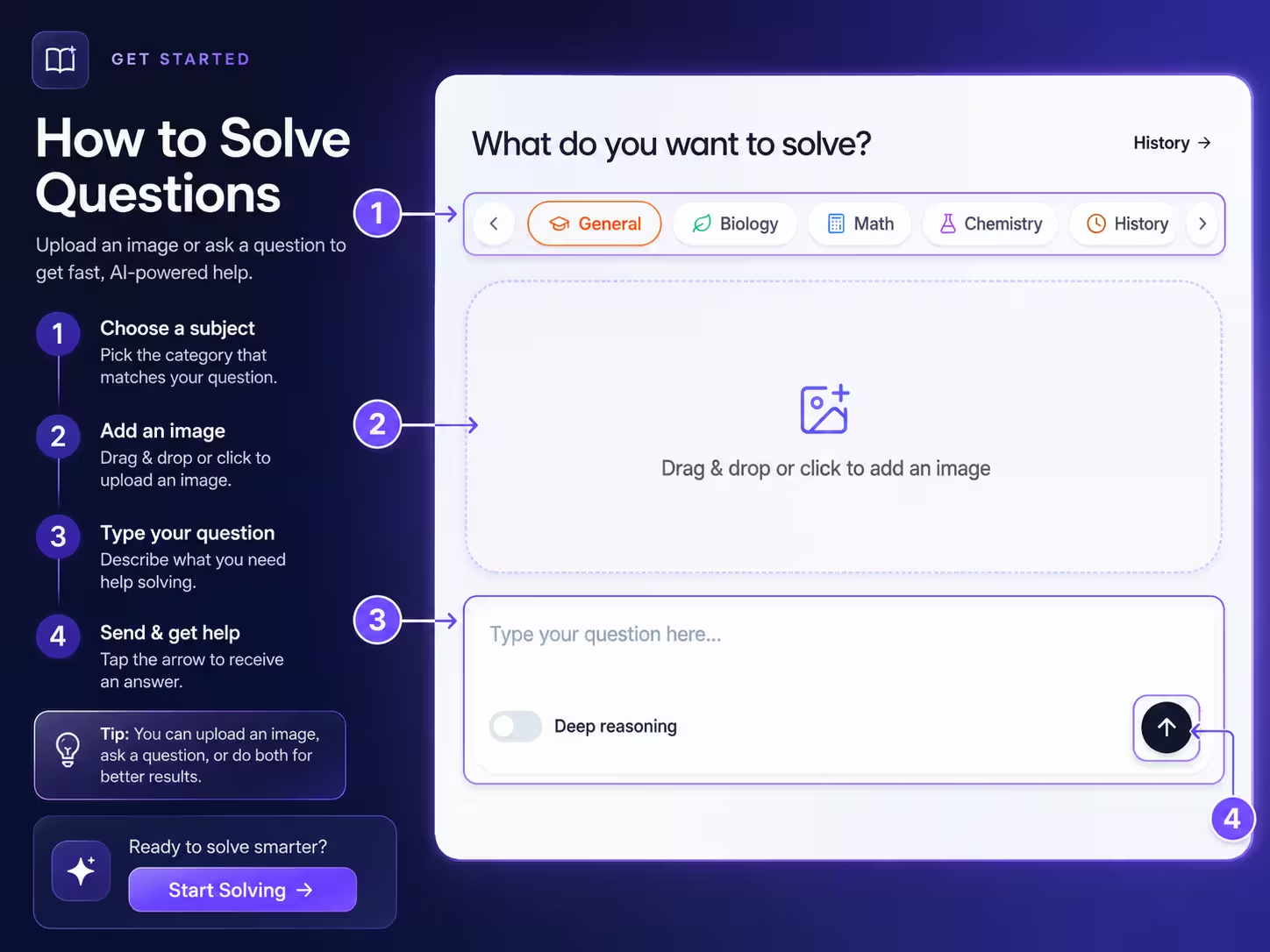
Stuck on One Question?
Solve It Step by Step.
Study sets cover a whole chapter. The homework solver handles the single problem that is blocking you right now. Snap a photo of it, paste it in, or just type the question, pick the subject, and get a worked solution you can follow line by line.
Study in Your Language
Generate Study Sets in Ten Languages
Read a textbook in one language and revise in another. Pick the output language before you generate, and the whole study set follows it.
Study Abroad Friendly
International students can keep the set textbook and still revise in the language they think fastest in.
Bilingual Revision
Generate one set in the course language and another in your first language to check that you really understood the concept.
Audio in Every Set
Tutor lessons read aloud and podcasts use ReadLoudly's natural AI voices, so listening practice comes free with revision.
How It Works
How to Create a Study Set in 3 Steps
Upload Your Document
Add a textbook chapter, lecture handout, or set of notes as a PDF, DOCX, or EPUB file.
Choose Your Study Tools
Tick the tools you want, set question counts and detail levels, and pick your language.
Learn, Test, and Listen
Work through the lesson, sit the quiz, flip the cards, and take the podcast with you.
Frequently Asked Questions
Common questions about creating AI study sets from your own course material.
A study set is everything Study Hub generates from one document. Upload a chapter and you can create a tutor lesson, multiple choice quiz, flashcards, fill in the blanks, a written test, notes, and an audio podcast from it, with the original file always open beside them.
Text-based PDF, Word (.docx), and EPUB files. Scanned or image-only PDFs and photo files are not supported for study sets, because the text has to be readable before questions and summaries can be generated from it.
Yes. Free accounts get a daily allowance of study sets and can use the tutor lesson, multiple choice, flashcards, fill in the blanks, and notes tools. Written Test and Podcast are on paid plans, and paid plans also raise the daily allowance. The allowance resets every day at midnight UTC.
Multiple choice, flashcards, and fill in the blanks can each be generated in sets of 5, 10, 15, or 20 items. Written tests run from 3 to 10 long-form questions, because each answer takes far longer to write and to mark.
Yes. Multiple choice, flashcards, fill in the blanks, and written tests can be rebuilt from the same document on paid plans, so a second attempt at a chapter gives you fresh questions rather than the ones you have memorised.
Yes. The podcast tool turns your chapter into a conversation between a host and a guest, each with a voice you choose. You can set the tone to Casual Chat, Deep Dive, News Style, or Storytelling, follow the live transcript as it plays, and download the audio for offline listening.
School, college, and university students revising set material, self-taught learners working through a textbook, and anyone preparing for a professional exam from a fixed syllabus. If your material exists as a document, it can become a study set.
Not sure which study tools to start with?
Tell us what you are studying and our team can suggest the combination of tools that suits your subject and exam format.
More Examples
Other Ways People Use ReadLoudly
AI Voice Generator for Student Text and Reading
Turn lecture notes, chapters, and handouts into natural audio you can revise with anywhere.
AI Tutor for Students
Every chapter explained in plain prose, with key points and natural read-aloud audio.
AI Tools for Researchers
Summarize and listen to academic PDFs so a heavy reading list stops being a bottleneck.
Turn Story Books into Audiobooks
Give any story a consistent AI narrator and listen to it as a finished audiobook.

Start listening smarter today
Join 4M+ readers who've transformed how they consume content. Turn any document into an engaging audio experience in seconds.