
Free AI Homework Solver
Photo in, steps out
Snap a photo of the question or type it in. You get every step of the working, the final answer, and a chat to ask why a step works.
How it works
-
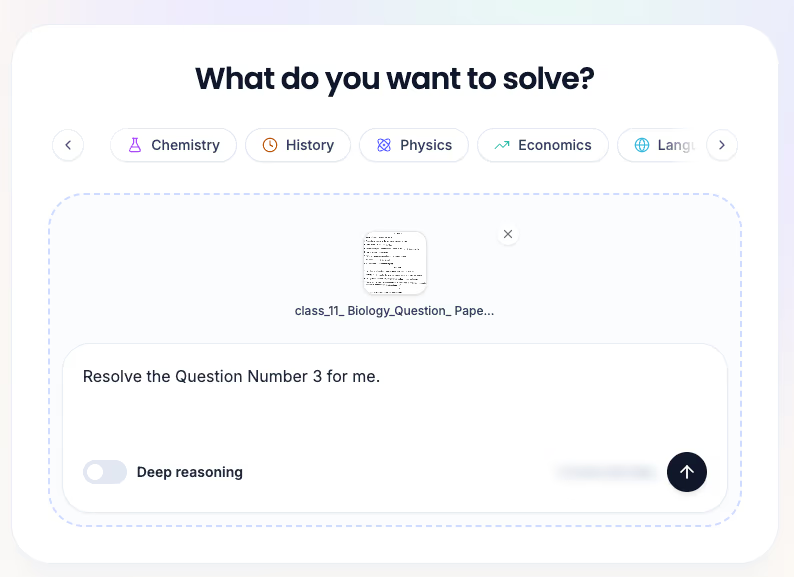
Add the question
Take a photo or screenshot (JPG, PNG or WEBP), type the question, or both.
-
Pick the subject
Math, physics, history and the rest, or General when it does not fit one.
-
Read the steps, then ask
Each question comes back as titled steps and a final answer. Ask up to 5 follow-up questions about it.
What you get back
Not just an answer to copy. The working is laid out so you can find the exact step where yours went a different way.
Titled steps and a final answer
Every question is worked through in numbered, titled steps, with equations rendered properly, and ends with the final answer.
A whole page at once
Photograph a full worksheet and each question comes back on its own, with the page's own numbering kept. If part of the photo is unclear, it tells you which part.
Follow-up questions
Ask "why step 2?" or "can you show another way?" right under the solution. Up to 5 follow-ups per solve, and they do not use your daily solves.
Concept videos and history
Each solution suggests concept videos that open a YouTube search on the idea behind it. Every solve is kept in your history, filtered by subject.
Subjects
- Math
- Physics
- Chemistry
- Biology
- Science
- History
- Humanities
- Literature
- Language
- Economics
- Psychology
- Computer science
- General
Solves a day
| Free | Core | Plus | Pro |
|---|---|---|---|
| 2 | 5 | 10 | 20 |
Follow-up questions are not counted. Need more solves? See the plans.
Homework solver questions
Is the homework solver free?
Yes. A free account gets 2 solves a day. Core raises it to 5, Plus to 10 and Pro to 20. Follow-up questions on a solution do not count toward the daily limit.
Do I need an account?
Yes, a free one. Your solves are saved to your history, so you can open any of them again and keep asking about it.
What can I give it?
A photo or screenshot of the question as JPG, PNG or WEBP, the question typed in, or both. Add a short note such as which question to solve, so it does not answer the whole page.
Which subjects does it cover?
Math, science, physics, chemistry, biology, history, humanities, literature, language, economics, psychology and computer science, plus a general option for anything else.
Are the answers always right?
No. AI can make mistakes, so check important answers against your notes or textbook. When part of a photo is hard to read, the solver lists what it could not make out instead of guessing.
Is using a homework solver cheating?
It depends on how you use it. Try the problem first, then compare your working with the steps and ask why at the point where yours went a different way. That way the solver checks your work instead of doing it.
Want to learn from it, not copy it? Read how to use a homework solver without cheating. Revising a whole chapter? The Study Hub turns it into quizzes and flashcards.
Stuck on a question right now?
Photograph it and compare your working, step by step.
Solve a question