
AI Homework Solver: How to Use One to Learn, Not Cheat
Students given plain chatbot access scored 17% lower once it was gone. Where the cheating line sits, what the research says, and a four-step routine for learning from a homework solver instead of copying it.

The answer is the cheapest part of homework. The working is what you are there for.
An AI homework solver can make you better at a subject or quietly worse at it, and the tool is the same either way. What changes the outcome is when you open it. Try the problem first and use the solver to check your work, explain a step you missed and test you again, and you learn. Paste in the question and copy the answer, and your practice grades rise while your scores fall once the AI is gone. That is what a 1,000-student field experiment found: students with a plain chatbot scored lower without it, while students whose AI gave hints instead of answers did not. It is the part a "snap a photo, get the answer" workflow skips.
Most students already use AI for homework. Between May and December 2025, the share of U.S. middle school, high school and college students using AI for homework rose from 48% to 62% (RAND American Youth Panel, March 2026). This guide covers the other question: how to use one so it helps. It sits inside our wider guide to studying with AI.
Key Takeaways
- Using an AI homework solver is cheating when you hand in its work as yours or your teacher has banned it. Checking your own attempt and asking it to explain a step is studying.
- In a PNAS study of about 1,000 high school math students, those with plain GPT-4 access scored 17% lower once it was taken away. A version that gave hints instead of answers showed no significant drop.
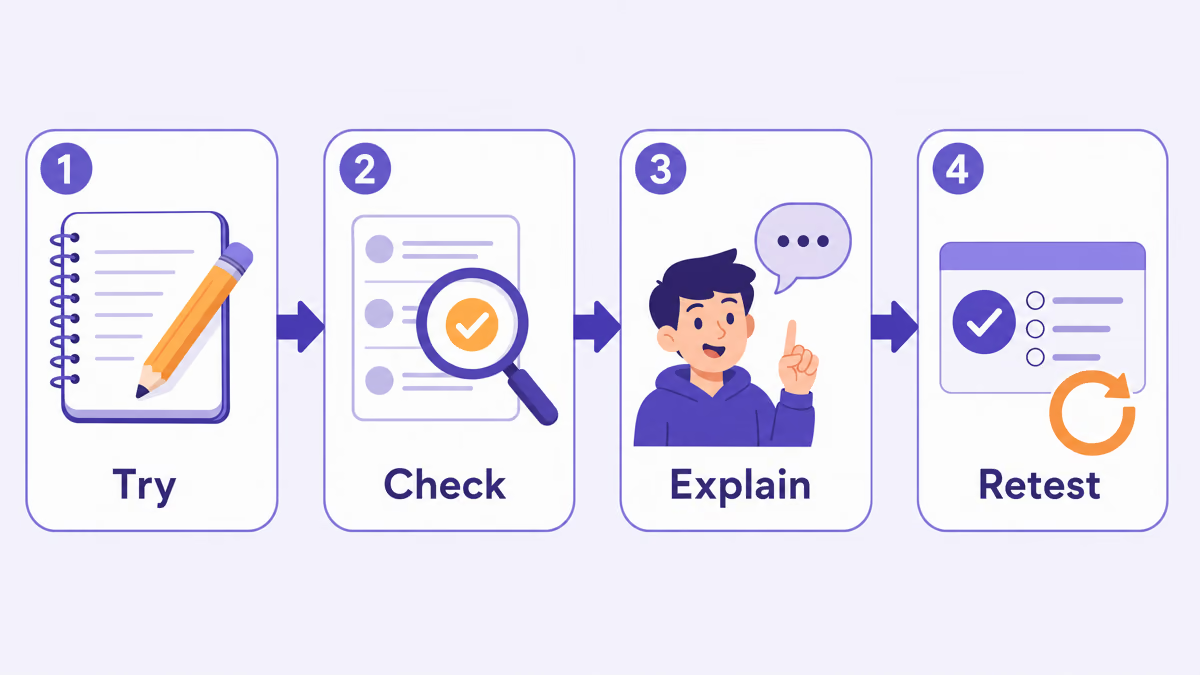
- Use a four-step routine: try the problem first, check it against the solver's steps, explain the step you missed in your own words, then retest on a fresh problem.
- AI solvers make mistakes. Common Sense Media found 39% of teens who used AI for schoolwork had spotted inaccuracies, so treat the answer as a second opinion, not an answer key.
Is Using an AI Homework Solver Cheating?
Using an AI homework solver is cheating when you submit its work as your own, or when your teacher or school has said not to use AI on that assignment. It is not cheating when you use it the way you would use a worked example in a textbook or a tutor: after you have tried, to find out where you went wrong. The line is about whose thinking ends up on the page.
The trouble is that most students are not told where that line sits. Only about one in three middle and high school students said their school had a schoolwide rule on AI for schoolwork, and just 9% of middle schoolers and 7% of high schoolers said their school permits AI for homework (RAND, March 2026, as reported by K-12 Dive). Meanwhile 59% of U.S. teens think using AI to cheat is a regular occurrence at their school (Pew Research Center, February 2026).
So check the rules for each class before you rely on a solver. Then use this test:
| Usually fine (if AI is allowed) | Crosses the line |
|---|---|
| Checking your finished answer against the solver's | Copying the solver's answer or working onto your sheet |
| Asking why a step works after you got stuck on it | Solving a graded quiz, test or take-home exam |
| Solving a similar practice problem to study the method | Rewording an AI answer so it "sounds like you" |
| Watching a concept video on the topic you missed | Using AI on work your teacher said to do without it |
What the Research Says About Copying Answers
Copying AI answers raises your homework grade and lowers what you can do on your own. The clearest evidence comes from a field experiment with about 1,000 students in grades 9 to 11 at a Turkish high school, published in PNAS. During practice, GPT-4 access improved grades by 48% for students using a plain chatbot ("GPT Base") and by 127% for students using a tutor version that gave hints instead of answers ("GPT Tutor"). When access was taken away, the GPT Base group performed worse than students who never had AI, with a "17% reduction in grades," while the GPT Tutor group showed no significant drop (Bastani et al., PNAS, 2025).
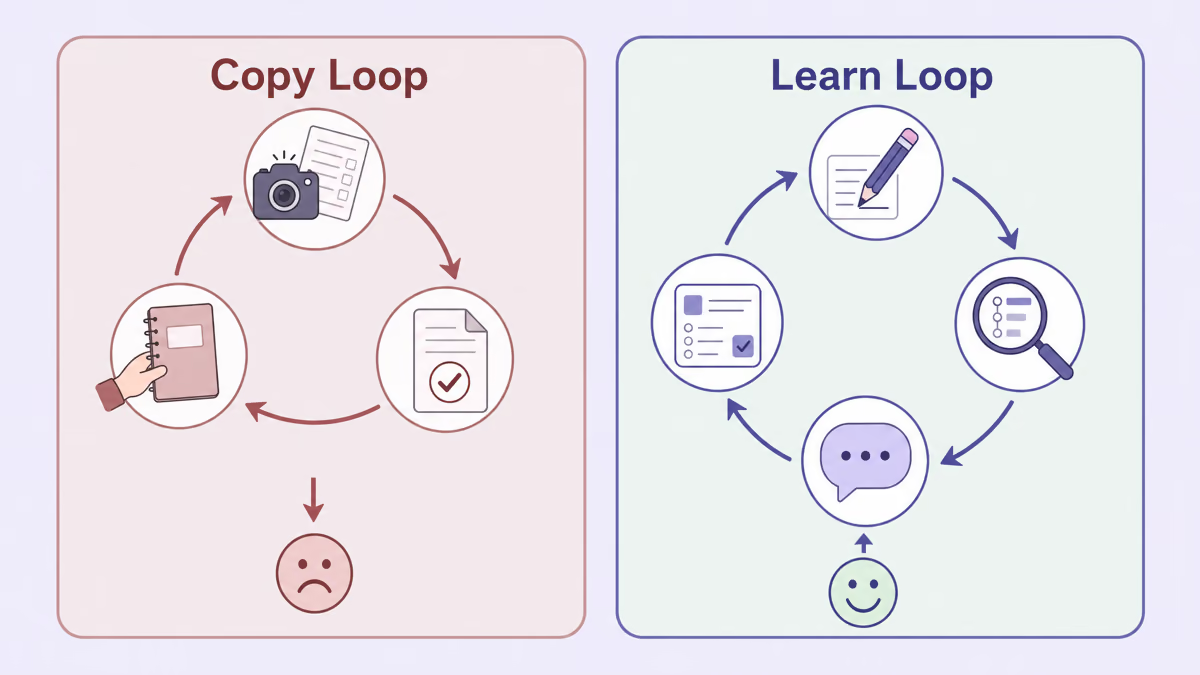
Two details from that study matter for how you use a solver. First, the students copying answers did not realise their learning had suffered. Second, when the AI was set up to give hints instead of the final answer, students showed no significant drop once it was removed. The difference was whether students did the thinking.
A well-designed AI tutor can even beat a good class. In a randomized trial with 194 Harvard introductory physics students, those taught by a carefully designed AI tutor "learn significantly more in less time" than in an in-class active learning session, with a median of 49 minutes on the AI lesson against 60 in class (Kestin et al., Scientific Reports, 2025). That tutor was designed to guide students through the problems rather than simply give answers.
Learning science explains why struggling first helps. A meta-analysis of 53 studies found that solving a problem before being taught the method beat instruction-first teaching, with an effect size of g = 0.36 (Sinha & Kapur, Review of Educational Research, 2021). The authors note the effect reversed for younger children in grades 2 to 5, so the advice here is for middle school and up.
Students are split on how they use AI answers. Among teens who get an answer to schoolwork from AI, 25% use it as-is, 31% rewrite it to sound like them and 35% improve it with what they know (Common Sense Media, August 2026).
Improving the answer with what you already know is the habit that keeps your own thinking in the loop. The routine below builds it in.
The Try, Check, Explain, Retest Routine
To learn from an AI homework solver, try every problem yourself before opening it, compare your attempt with its steps, explain the step you missed out loud or on paper, and then solve a fresh problem of the same type without help. It adds a few minutes per problem.
-
Try it first, for real
Give each problem an honest attempt, even a wrong one. Write down where you got stuck and what you guessed. A wrong attempt is not wasted: studies of solving before instruction found students learned more when they attempted problems before being taught.
-
Check your steps, not just the answer
Now run the problem through the solver and compare line by line. Matching final answers can hide a lucky error, so find the first step where your working and the solver's differ. That step is the one you actually need to learn.
-
Explain the missed step in your own words
Close the solution and say, or write, why that step works. If you cannot, ask the solver a follow-up such as "why did you divide both sides by 2 here?" and try the explanation again. Being able to explain it without looking is the sign you have it.
-
Retest on a fresh problem
Pick the next problem of the same type, or change the numbers in the one you just did, and solve it without the solver. If you get it, move on. If not, go back to step 3. A short quiz a day or two later helps it stick.
A rule of thumb: two minutes
If you have been stuck on a problem for more than a couple of minutes with no new idea, stop and ask the solver for the first step only, not the whole solution. Then close it and carry on yourself. You keep the momentum without handing over the thinking.
Using ReadLoudly's Homework Solver This Way
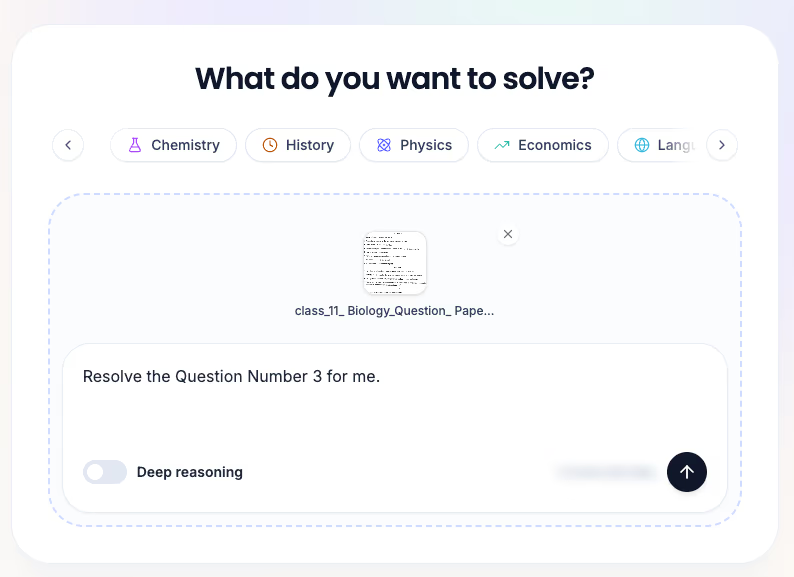
ReadLoudly Solve, the homework solver inside Study Hub, has features that fit the routine above: it shows titled steps, lets you ask follow-up questions on the same solution, and flags any part of your photo it could not read clearly. Each part maps to one of the four steps.
Ask about the question you tried
Open Solve, pick a subject (General, Math, Science, Humanities, CS, Chemistry, History, Language, Literature, Economics, Biology or Physics), then type the question or add a photo of the page. Photos can be JPEG, PNG or WebP, up to 10 MB. You can point it at one question, as in "Resolve the Question Number 3", so it does not solve the whole worksheet for you. Turn on Deep reasoning for harder, multi-step problems.
Compare your working with titled steps
Each answer is laid out as numbered, titled steps, such as Step 1, "Why polynomials are the right objects for complex roots", followed by the working, a final answer and, on some problems, a Quick check section. When you upload a whole page, every question comes back separately with the paper's own numbering kept, like 1, 1(i) or 2(a), so you can match each one to your attempt.
Ask "why" with follow-up questions
Under every solution there is a follow-up box ("Ask a follow-up question on this solution…"). This is step 3 of the routine. Ask why a step works, ask for the step explained a different way, or ask for a similar problem to try on your own. The conversation stays attached to that solution in your Solve history, so you can come back to it before a test.
Watch a concept video when the idea itself is missing
Sometimes the gap is not a step but the whole concept. Below the solution, Solve suggests a few concept videos, such as "Fundamental Theorem of Algebra and complex roots (clear explanation)". Each card opens a YouTube search for that topic, so you choose the explainer that suits you.
It says when it could not read your photo
This is the feature we would point to first. A photo with one misread digit produces a solution that is wrong but perfectly consistent: if 2.5 is read as 2, every step can be flawless and the answer still wrong. So when Solve cannot read part of a page clearly, it puts a notice above the solution, "Check this answer against your paper", explains that a value may have been read wrong, and lists which question was unclear, with the option to retake the photo. The working stays visible, so you can confirm the one number in doubt. The solution page also carries the note "ReadLoudly can make mistakes. Check important info."
Are AI Homework Solvers Accurate?
AI homework solvers are right often enough to be useful and wrong often enough that you should never hand in an answer you have not checked. Among teens who had used generative AI for schoolwork, 39% said they had found inaccuracies in its output (Common Sense Media, January 2025).
Math word problems show why. Researchers at Apple found that "adding a single clause that seems relevant to the question causes significant performance drops (up to 65%) across all state-of-the-art models," and that changing only the numbers in a problem also lowered accuracy (Mirzadeh et al., GSM-Symbolic, ICLR 2025). The models they tested are older than today's, but the lesson holds: a model can follow the pattern of a problem without the reasoning behind it.
Photos add a second source of error, because the solver has to read the page before it can solve it. Four quick checks catch the common problems:
- Read the question back. Make sure the solver read the question the same way your paper shows it, digit for digit.
- Substitute the answer. Put the result back into the original equation or conditions and see if it holds.
- Estimate first. A rough guess before you look tells you when an answer is off by a factor of ten.
- Compare with your own attempt. If you and the solver disagree, work out who is wrong before you trust either.
Can Teachers Tell You Used AI?
Teachers usually cannot prove AI use from the finished answer alone, and AI detectors are not reliable enough to settle it. A Stanford study ran essays through seven detectors and found an average false-positive rate of 61.3% on TOEFL essays written by non-native English speakers, while essays by U.S. eighth graders were classified almost perfectly (Liang et al., Patterns, 2023). The detectors have been updated since, but the study shows how easily honest work gets flagged.
What teachers can tell is whether you understand the work. Math homework that is perfect followed by a quiz you cannot start is the giveaway, and it is the same gap the PNAS study measured. The routine in this guide is also your best protection if you are ever questioned: keep your first attempts and rough working. A page of crossed-out tries is good evidence that the thinking was yours.
How Parents and Teachers Can Help
Most students are working out the rules on their own. Only 27% of teens say a teacher has ever talked with them about how to use AI safely (Common Sense Media, August 2026), and only 18% of U.S. K-12 teachers receive formal guidance from administrators on AI use (Gallup and the Walton Family Foundation, May 2026).
Many students share the worry. In December 2025, 67% of students said using AI for schoolwork harms critical thinking, up from 54% earlier that year, and the concern was higher among non-users (78%) than users (60%) (RAND, March 2026). That makes the conversation easier to start. Three practical moves:
- Ask for the attempt first. Before a student opens a solver, ask to see their try. It turns the tool into a checker by default.
- Ask them to teach it back. "Show me how you did number 4" takes one minute and reveals whether the understanding is there.
- Say where AI is allowed. A clear rule per assignment removes the guesswork most students are dealing with.
After Solving: Turn Problems Into Practice
Retesting right away shows whether you have it. Practising again a few days later helps it last. Once a chapter's homework is done, upload your notes or the chapter to Study Hub and make a set of practice quiz questions from your notes or flashcards from the PDF to review over the next few days. If you study better by ear, turn the chapter into a podcast for the bus ride.
And when the test is tomorrow, our night-before-the-exam guide shows how to spend the time you have. Use the solver for the problems you still cannot do alone, and put everything else into retesting yourself.
Try the routine on tonight's homework
Do the problem first, then check it in Solve: titled steps, follow-up questions on the same solution, and a clear warning when part of your photo could not be read.