
AI Flashcards for Students: Any Chapter, Turned into a Deck You Can Flip.
Flashcards is the recall tool inside ReadLoudly Study Hub. Upload a textbook chapter, a set of lecture notes, or a reading pack and it writes a deck of front-and-back cards from the material — a term or a question on the front, the answer on the back — that you flip with a click or the space bar, in the same study set as your quiz, tutor lesson, and notes.
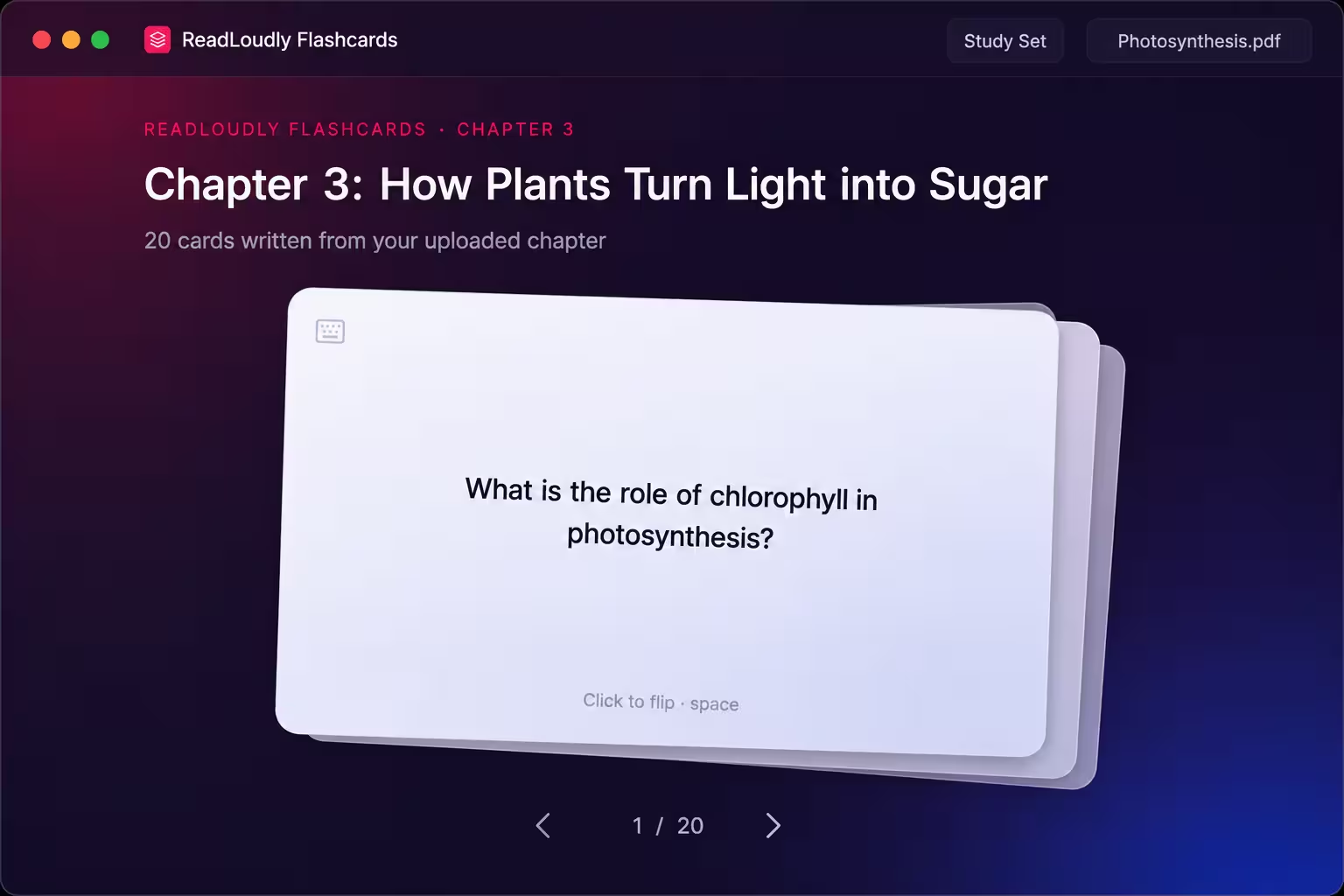
Flashcards · Chapter 3
Deck ready · 20 cards · Card 1 / 20
What Makes These Flashcards Different
Not a Deck Someone Else Made. A Deck Made From Your Chapter.
Public flashcard sites hand you a stranger's cards on roughly your topic. The Flashcards tool reads the document you upload and writes the cards from it — so the terms, the phrasing, and the emphasis are the ones your course actually uses.
Written From Your Document
Every card comes from the file you uploaded. The deck is drawn from across the whole document, not just the opening pages, so the later sections of a long chapter get cards too.
Front and Back, Kept Short
The front is a term, a name, or a question of a few words. The back is a complete answer that still fits on a card — long enough to be correct, short enough to be recalled in one go.
Recall Before You Reveal
The answer stays hidden until you flip. That pause where you produce the answer yourself is the whole point of a flashcard, and the deck is built to protect it.
The Deck
Click to Flip. Space to Flip. Arrows to Move.
A flashcard is only as useful as the habit it builds, so the deck is made to be worked through fast — hands on the keyboard, one card at a time, answer first and flip second.
Sample card · click or tap to flip
Answer in Your Head,
Then Turn the Card Over.
Each card shows its front alone until you choose to flip it. The back turns over in a 3D animation, so you always know whether you are looking at a fresh question or an answer you have already revealed, and the next card arrives with one keypress.
Five Cards for a Quick Check,
Twenty for a Full Chapter.
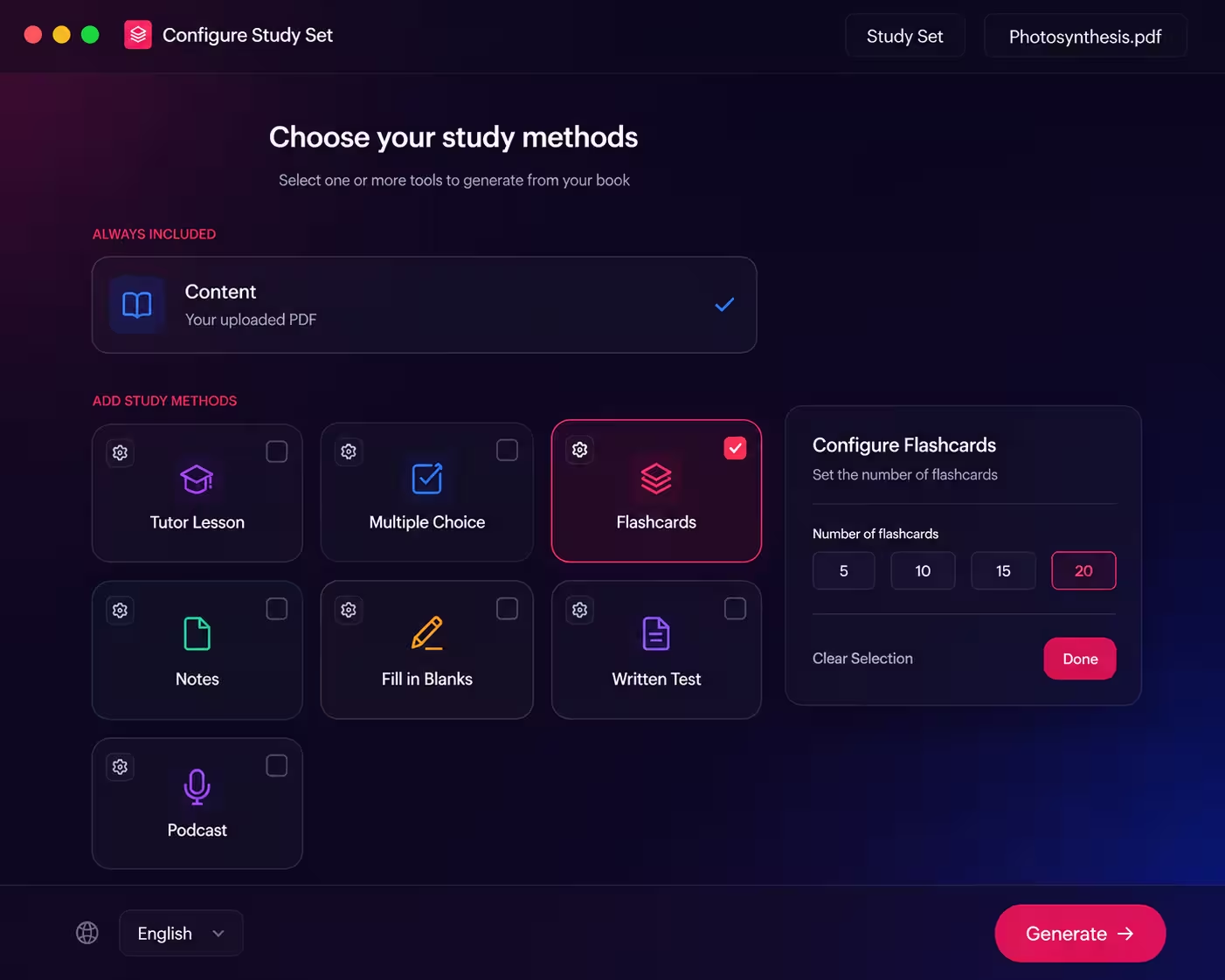
Before the deck is written you choose how many cards you want. The tool then covers the document with that many, spreading the cards across the topics rather than stacking them all on the first section.
-
5
Five cards
A quick check on a chapter you already know. Enough for the walk to a class.
-
10
Ten cards
The main terms of a single lecture or a short reading — one sitting, no scrolling.
-
15
Fifteen cards
A typical chapter: the definitions, the key names, and the two or three ideas that hold it together.
-
20
Twenty cards
A dense chapter or a whole reading pack, when you want the deck to be the revision rather than a warm-up for it.
Chose too few? On paid plans you can rebuild the deck from the same document with a different count — and a rebuild writes fresh cards, so the second deck is not the first one reshuffled.
Inside the Study Set
The Source, a Chat, and Your Notes, One Click from the Card
A flashcard deck on its own is a list of answers with the working hidden. In Study Hub the deck sits inside the study set, so checking a card against the page it came from takes one click, not a second app.
Revising with cards is not the same as reading. You get one wrong and want to see why, you find a card that is too short and want the full paragraph, and you want somewhere to keep the five cards that keep tripping you up. The study set is built around those moments.
-
The deck stays in the set
Come back tomorrow, next week, or in exam month and the same deck is waiting under the same document. Nothing to export, nothing to re-import.
-
The original document, one click away
When a back looks too thin, or you want the paragraph around a definition, the page it was written from opens beside the deck.
-
The other six tools share the upload
The same file that produced the deck can produce a quiz to test it, a tutor lesson to explain it, and notes to summarise it — without uploading twice.
Content
The original document, open from the study set sidebar. When an answer looks wrong or too short, the page it came from is one click away.
Chat
Ask why the answer on the back is the answer. The chat knows your document, so the explanation comes from your chapter and not from the internet at large.
Notes
Your own writing, saved with the study set. The cards you keep getting wrong can become a short list you read before the next session.
A Deck in the Language
You Revise In.
Study sets can be generated in ten languages, and the flashcards follow the language of the set. International students can keep the set textbook and drill its terms in the language they think fastest in — or make one deck in each and use the second to check the first.
Available Set Languages
The language applies to the whole study set, so a quiz, lesson, and notes generated from the same upload match the deck.
Use Cases
When AI Flashcards Are the Right Tool
Vocabulary-Heavy Modules
Anatomy, law, pharmacology, a language course — any subject where the exam is partly a test of whether you know what the words mean. Twenty cards per chapter and the terms stop being the hard part.
Formulas, Dates, and Names
The material that is not hard to understand but easy to forget. A card per formula, per date, or per name, worked through until the answer arrives before the flip.
Five Minutes Between Lectures
A deck opens in any browser, on a phone included. The gap between two classes is enough for a pass through ten cards — the short, repeated session that flashcards are made for.
A Deck Per Chapter, All Term
Generate the deck the week a chapter is taught, then come back to it every few weeks. In exam week you are reviewing decks you already know instead of building them from scratch.
Recall and Retention
Why Flipping a Card Beats Re-reading the Page
Re-reading tells you that a page looks familiar. A flashcard makes you produce the answer with the page closed — and it is the act of retrieving it, not recognising it, that strengthens the memory.
A Sensible Order
Tutor Lesson
Understand the chapter
Flashcards
Drill the terms until recall is automatic
Multiple Choice
Test recognition under exam conditions
Written Test
Argue it in full prose
Flashcards work best once you understand the material. Be taught the chapter first, then drill its terms — a card you can flip but cannot explain is a warning, not a win.
-
1
Retrieval, Not Recognition
Reading a definition and nodding is recognition. Saying the definition before you flip is retrieval, and retrieval is the version that survives to exam day.
-
2
Feedback While the Attempt Is Fresh
The flip is the check. You find out whether you were right seconds after answering, while the mistake is still clear enough to correct.
-
3
Sessions Short Enough to Repeat
A twenty-card deck takes minutes, which is why it gets done again tomorrow. Repetition spaced over days is what turns a fact you looked up into one you know.
Works With
One Upload, the Whole Study Set
Flashcards is one of seven tools generated from the same document. Add the rest to the same study set whenever you are ready to be taught, tested, or talked through it.
Tutor Lesson
Every chapter explained in plain prose with key points, then read aloud.
Multiple Choice
Practice questions with instant feedback and an explanation for every answer.
Fill in the Blanks
Key sentences with the term missing — harder than a card, because there is no front to prompt you.
Podcast
A two-host audio discussion of the same chapter, with a live transcript.
How It Works
How to Turn a PDF into Flashcards in 3 Steps
Upload Your Chapter
Add a PDF, Word file, or EPUB to Study Hub — a textbook chapter, lecture notes, or a reading pack.
Pick Flashcards and a Deck Size
Tick Flashcards, choose 5, 10, 15, or 20 cards, set the language if you want one other than English, and generate.
Flip Through the Deck
Work through the cards with a click or the keyboard, then come back to the same deck whenever the terms start to fade.
Prefer a step-by-step walkthrough? Read the guide on how to turn any PDF into flashcards and make them stick.
Frequently Asked Questions
Common questions about turning your own course material into AI flashcards.
It is a tool that writes flashcards from a document instead of asking you to type them. ReadLoudly reads the PDF, Word file, or EPUB you upload and produces a deck of front-and-back cards from the material — a term or a question on the front, the answer on the back — inside the same study set as your quiz, tutor lesson, and notes.
Yes. Upload the PDF to Study Hub, tick Flashcards, choose how many cards you want, and generate. The cards are written from the text of the PDF, so they use your course's own terminology. Word (.docx) and EPUB files work the same way. Scanned or image-only PDFs are not supported, because a page that is really a photograph has no text to write cards from.
You choose 5, 10, 15, or 20 cards per deck. The tool spreads the cards across the whole document rather than the first few pages, so a twenty-card deck on a long chapter covers the later sections too. On paid plans you can rebuild the deck from the same document with a different count, and the rebuild writes fresh cards.
The front is a short term, name, concept, or question — a few words, never a paragraph. The back is a complete answer or definition that still fits on a card. Decks mix key terms, concepts, and definitions from across the document, so twenty cards are not twenty variations of one idea.
Click the card or press the space bar to flip it. Use the right and left arrow keys, or the on-screen arrows, to move to the next or previous card. The deck wraps around, so moving past the last card takes you back to the first, and a counter shows where you are in the deck.
Yes. Flashcards is included on the free plan, within the daily study set allowance. Paid plans raise that allowance and add the ability to rebuild a deck. Written Test and Podcast are the two Study Hub tools that need a paid plan.
Quizlet and Anki are built around decks you write yourself or import from other people, and Anki's spaced-repetition scheduler is something ReadLoudly does not offer. What ReadLoudly does is the step before that: it writes the deck from your own document, and puts it next to a quiz, a tutor lesson, notes, and a podcast generated from the same upload.
Yes. Study sets can be generated in English, Arabic, French, Spanish, German, Chinese, Hindi, Portuguese, Turkish, or Japanese, and the flashcards follow the language of the set. Many students make one deck in the course language and a second in their first language to check that the concept, not just the word, has landed.
Not sure how many cards to make?
Tell us the subject and how long the chapter is, and our team can suggest a deck size that fits.
More Examples
Other Ways People Use ReadLoudly
Or start from the tools themselves — free AI study tools that turn one upload into a quiz, flashcards, notes and more.
AI Study Tools for Students
One upload becomes a full study set: quizzes, flashcards, notes, written tests, and a podcast.
AI Tutor for Students
Every chapter explained in plain prose, with key points and natural read-aloud audio.
AI Study Podcast for Students
Your chapter as a two-host audio episode, with a transcript and an MP3 to take anywhere.
AI Quiz Generator for Students
A multiple choice quiz written from your own chapter, with instant feedback and an explanation for every answer.
Listen to Your Course Reading
Turn lecture notes, chapters, and handouts into natural audio you can revise with anywhere.
AI Tools for Researchers
Summarize and listen to academic PDFs so a heavy reading list stops being a bottleneck.
Turn Story Books into Audiobooks
Give any story a consistent AI narrator and listen to it as a finished audiobook.

Start listening smarter today
Join 4M+ readers who've transformed how they consume content. Turn any document into an engaging audio experience in seconds.