
How to Turn Any PDF Into Flashcards (and Make Them Actually Stick)
Students who self-tested recalled 61% of a passage a week later; students who reread it four times recalled 40%. Turning a PDF into flashcards now takes a minute. Here is the four-step workflow, how many cards to make, how to audit the AI, and the review schedule that makes the deck stick.
"The chapter you keep rereading is not getting into your head. The twenty questions you could not answer about it would be."
Turning a PDF into flashcards takes about a minute in 2026: upload the file, pick a deck size, and an AI writes a question-and-answer card for each key idea in the document. The harder part, and the part almost nobody explains, is what to do with the deck so the material is still there on exam day. This guide covers both.
The reason it matters is not convenience. In a survey of 177 undergraduates, 84% said they study by rereading, 55% called rereading their number-one strategy, and only 11% tested themselves while studying (Karpicke, Butler & Roediger, Memory, 2009). Rereading is one of the techniques the research rates low utility. Practice testing, which is what a flashcard deck is, is one of only two it rates high. A PDF-to-flashcards tool removes the one excuse students had for not switching: the hour it took to write the cards.
Key Takeaways
- Testing yourself on a text beats rereading it: one week later, students who self-tested recalled 61% of a passage versus 40% for students who reread it four times (Roediger & Karpicke, 2006).
- Turning a PDF into flashcards takes four steps and about a minute: upload, choose Flashcards and a deck size (5 to 20 cards), generate, then flip through the deck from the same screen as the original document.
- Do not accept AI cards blindly. Even the best frontier model produced unusable flashcards 36% of the time in a 2026 evaluation, and students who put cards in their own words remembered more than students using premade ones (d = 0.45).
- One bigger deck reviewed across several days beats several small decks crammed in one sitting. 90% of students learned more with spacing, yet 72% believed cramming had worked better (Kornell, 2009).
- PDF-to-flashcard generation is free on ReadLoudly, and the full Study Hub is $5/month on ReadLoudly Core. Dedicated flashcard apps charge $10 to $25 a month for a single format.
Part of our guide to how to study with AI in 2026, which covers the full document-to-study-set system this post is one step of.
Why Flashcards From Your PDF Beat Rereading It
Flashcards work because answering a question pulls a memory out of your head, and every retrieval makes the next one easier. Rereading only puts the same information back in, which feels productive and leaves almost nothing behind. This is the testing effect, and it is one of the most replicated findings in learning science.
The clearest demonstration is still the 2006 experiment that put it on the map. Students read a short passage and then either reread it repeatedly or spent the same time recalling it from memory. Five minutes later the rereaders were ahead. One week later, the group that read once and tested three times recalled 61% of the passage; the group that read it four times recalled 40% (Roediger & Karpicke, Psychological Science, 2006).
That result has held up at scale. A 2021 meta-analysis of 222 classroom studies covering 48,478 students found quizzing raised achievement with a medium effect size of g = 0.50 (Yang et al., Psychological Bulletin, 2021). And in the most cited review of study techniques, practice testing and spaced practice were the only two of ten methods rated "high utility," while rereading and highlighting were rated low (Dunlosky et al., Psychological Science in the Public Interest, 2013).
A flashcard deck built from your PDF is practice testing in its purest form: one question per idea, answered from memory, with the answer a flip away. The only reason 84% of students still reread instead is that writing the cards used to cost an evening. That cost is now gone.
How to Turn a PDF Into Flashcards, Step by Step
The workflow below uses ReadLoudly's Flashcards tool inside Study Hub, because it is free and generates from your own document rather than a chatbot's memory of the topic. The same four steps apply to any document-grounded flashcard generator, and step four applies to all of them.
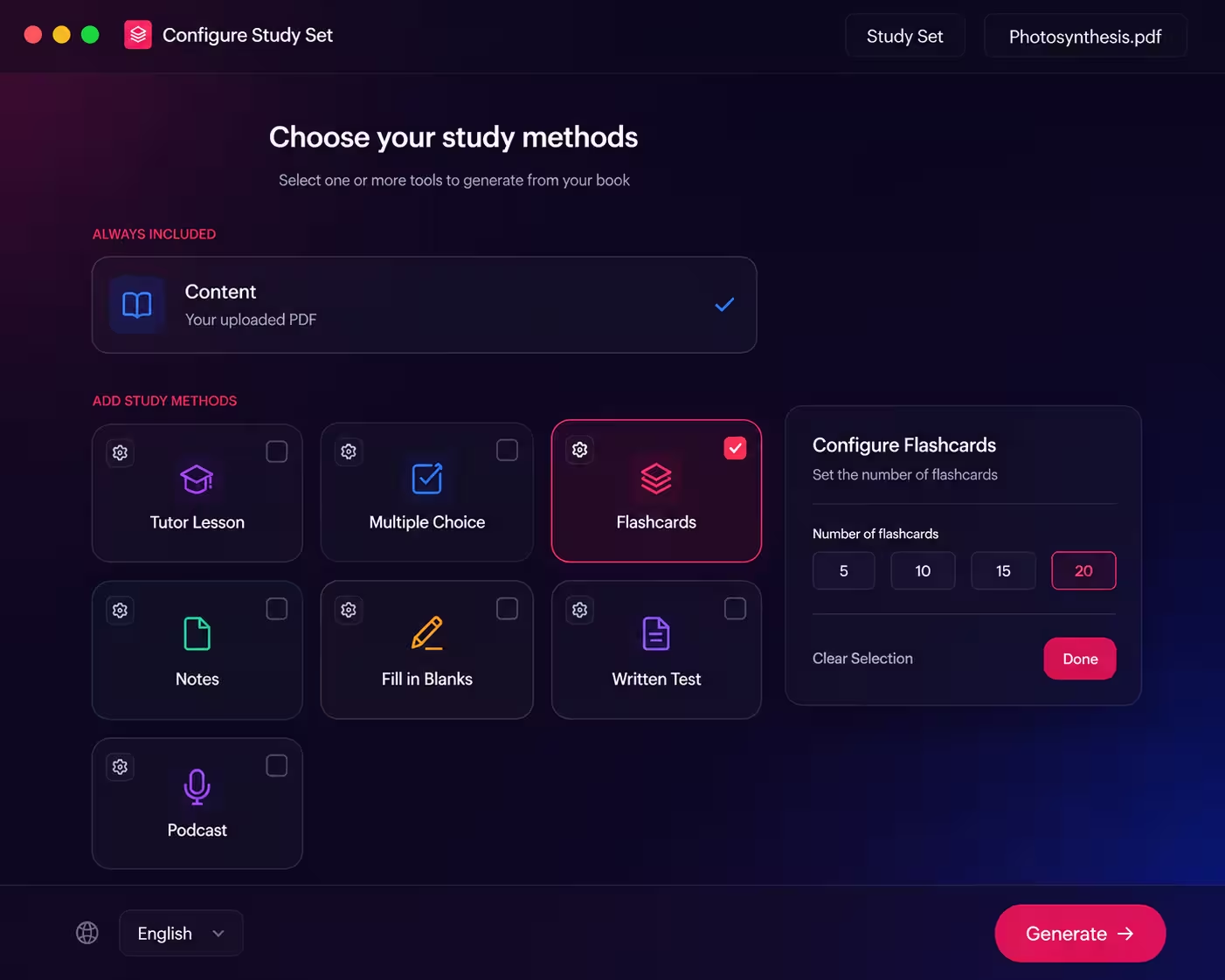
Upload the PDF you will actually be tested on
Open Study Hub, sign in (free), and upload one file. PDF, DOCX and EPUB all work, as long as the file has real text: Study Hub rejects scanned or image-only PDFs at upload, because a page that is really a photograph has no text to write cards from. Upload one chapter or one lecture's slides, not the whole textbook: the cards are drawn proportionally from the entire document, so a 400-page upload spreads twenty cards very thin.
Choose Flashcards and a deck size
On the configure screen, tick Flashcards and pick 5, 10, 15 or 20 cards. That is the only setting, on purpose: the generator already writes each card as a short question on the front (under 15 words) and a compact answer on the back (under 60 words), and spreads the questions across the whole document rather than clustering on page one. You can tick a multiple-choice quiz in the same pass if you want a second format from the same upload; the podcast and written test need a paid plan.
Generate, then take the deck cold
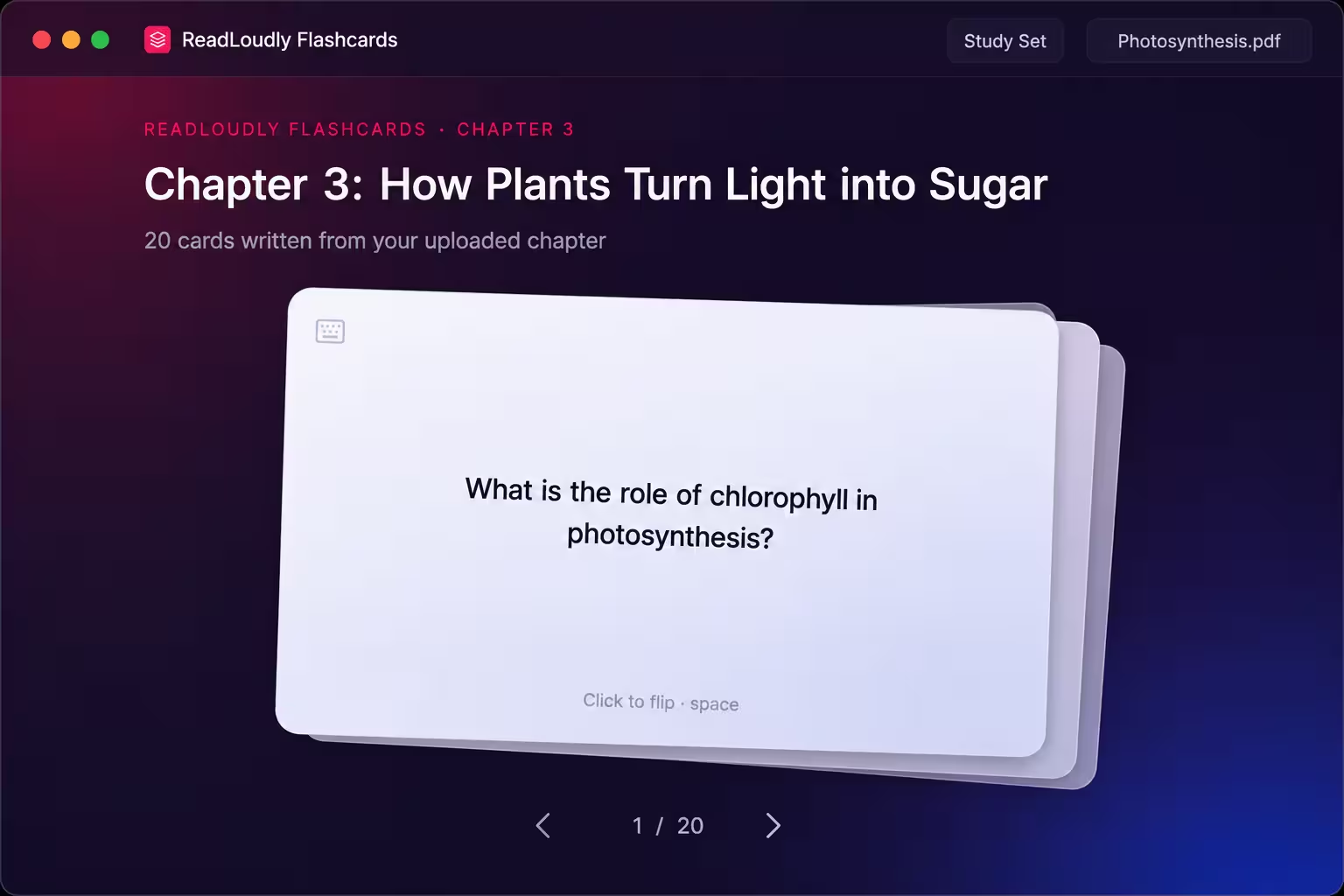
Generation takes about a minute. Before you reread anything, go through the deck once: read the front, say the answer out loud, then click or press Space to flip. Arrow keys move between cards and the deck wraps around, so you can loop it. Your first pass is a diagnostic: the cards you got wrong are a map of what the chapter has not taught you yet.
Check the wrong cards against the source and make them yours
The original document sits one click away in the sidebar. For every card you missed, open the source from the sidebar, find the page, confirm the back is right, and write the answer in your own words in the Notes panel beside the deck. That thirty seconds of paraphrasing is where most of the learning happens, and it is the step every "instant flashcards" tutorial skips. The next section explains why.
The deck stays saved under the document, so the same set is waiting tomorrow, next week and in exam month. If a first pass shows the deck missed something important, Regenerate (a paid feature) writes a fresh deck from the same upload. And because the upload is shared, the quiz, tutor lesson and notes in ReadLoudly Study Hub come from the same file without uploading it twice, and so does the podcast on a paid plan.
How Many Flashcards Should You Make From One Chapter?
Make one deck of 15 to 20 cards per chapter and review the whole thing each session, rather than splitting the chapter into several five-card decks you master one at a time. The research on this is unusually direct, and it contradicts what feels right.
In three experiments, students learned vocabulary either as one 20-card stack studied across four sessions or as four 5-card stacks each studied to completion in one go. Combining all three experiments, 90% of participants learned more with the single spaced stack, and only 6% did better with the small massed ones. Yet when asked afterwards, 72% of participants believed the small crammed stacks had worked better (Kornell, Applied Cognitive Psychology, 2009). Small decks feel easier because you see each card again within seconds. That is exactly why they teach less.
5 cards
A quick check on a chapter you already know well, or a single short reading. Enough for the walk to class, not enough to be your only revision.
10 cards
The core terms of one lecture or a short article. One sitting, no scrolling, and small enough to loop three times in ten minutes.
15 cards
A typical textbook chapter: the definitions, the named people or processes, and the two or three ideas that hold it together. The default on the free plan.
20 cards
A dense chapter or a whole reading pack, when you want the deck to be the revision rather than a warm-up for it. The size the spacing research above was run on.
One more counter-intuitive finding: do not drop cards from the deck once you think you know them. Across four experiments, letting students remove "learned" cards had "small but consistently negative effects on learning" (Kornell & Bjork, Memory, 2008). Students are poor judges of which cards are safe to retire. The deck wraps around for a reason: keep looping the whole thing.
Check the AI's Cards Before You Trust Them
AI-generated flashcards save time, but they are not automatically good, and treating them as finished is the mistake that turns a minute saved into a grade lost. Three findings from the last year set realistic expectations.
Generation quality varies, even at the frontier. An independent 2026 evaluation of roughly 1,500 highlight-anchored flashcards across 93 source texts found the best model tested, GPT-5.2, still produced unusable cards 36% of the time, and models were poor at predicting which of their own reasonable-looking cards would survive long-term review (Kirkby & Matuschak, Memory Machines, 2026). Generating from your own document, as Study Hub does, reduces invented facts because every back traces to the document sitting in the sidebar. It does not guarantee every card asks the right question.
Time saved is real; automatic grade gains are not. When a medical school offered AI-generated Anki decks alongside its normal materials, 74% of students reported the flashcards saved them time, but exam scores in the two blocks studied were no different from before (Khurana et al., medRxiv preprint, 2025). In a separate data-science course study, students scored 89% on retention checks in weeks with AI-generated retrieval questions versus 73% without, but the authors stressed that instructors reviewed every question first (An et al., arXiv preprint, 2025). The pattern across both: reviewed cards help, unreviewed cards mostly save time.
Cards in your own words beat cards handed to you. Across six experiments, students who created their own flashcards remembered more than students given premade ones, an advantage of d = 0.45 on memory questions and d = 0.29 on application questions. The advantage held when students paraphrased or even copy-pasted, but vanished when they transcribed word for word, and it persisted against high-quality premade cards (Pan et al., Journal of Applied Research in Memory and Cognition, 2022).
Put together, those three findings give you a two-minute audit to run on every generated deck, and a reason to do it:
Does the front have exactly one answer?
"What is photosynthesis?" is a bad card because any paragraph counts as correct. "Which wavelengths does chlorophyll absorb?" is a good one. Rewrite vague fronts in Notes as a sharper question you will ask yourself instead.
Does the back match the page it came from?
Open the source from the sidebar for any card that surprises you. A back that adds a detail the chapter never states is the card to distrust, however plausible it reads.
Have you said the answer in your own words at least once?
This is the d = 0.45 step. Saying the back aloud before flipping, then paraphrasing it in Notes for the cards you missed, converts a premade card into a self-made one at a fraction of the cost of writing it from scratch.
A Review Routine That Makes the Deck Stick
A generated deck only pays off if you come back to it, and the research on when to come back is as strong as the research on testing itself. A synthesis of 839 assessments across 317 experiments found that spreading practice over time reliably beat massing it, and that the best gap between reviews grows as the exam gets further away (Cepeda et al., Psychological Bulletin, 2006).
ReadLoudly does not schedule reviews for you, and we are not going to pretend it does: apps like Anki own that feature, and if you are a medical student running thousands of cards a day it is the right tool. For one deck per chapter, a calendar and the schedule below do the same job:
One deck, five sessions
- Day 0 (10 min): generate the deck, take it cold, run the two-minute audit, paraphrase the misses in Notes.
- Day 1 (5 min): one full loop of the whole deck, no dropping. Answer aloud before every flip.
- Day 3 (5 min): another loop. If more than a third are still wrong, reread only the pages those cards came from, then loop again.
- Day 7 (5 min): one loop, ideally after listening to the chapter on a commute. Pairing audio with a flashcard rep is the cheapest way to get a spaced session into a day with no desk time.
- Exam week (15 min): loop every chapter deck back to back, then generate a practice quiz from the same uploads and take it closed-book.
Thirty minutes across a week, per chapter, is the whole commitment. The Day 7 session is where audio earns its place: convert the same PDF with a PDF-to-audio reader or use the textbook audio reader workflow, listen at 1.25x on the bus, and loop the deck when you sit down. If the exam is tomorrow and none of this happened, our night-before-the-exam guide is the damage-control version.
What PDF-to-Flashcard Tools Cost in 2026
Turning a PDF into flashcards should cost you nothing, and a complete study toolkit around it should cost about $5 a month. Here is what the main options charged when we checked their official pricing pages and app listings on September 7, 2026. Prices change often, so treat this as a snapshot.
| Tool | PDF to flashcards | Paid tier | Honest note |
|---|---|---|---|
| ReadLoudly Study Hub | Free, from your own text PDF, DOCX or EPUB | $5/mo (Core) | No spaced-repetition scheduler; you run the calendar above |
| Anki | No built-in generator; import decks or write cards | $0 desktop, $24.99 once on iOS | Best scheduler in the category; steep setup |
| Knowt | Free tier with limits | $12.49/mo billed $149.99/yr, or $24.99/mo | Strong AP and exam library |
| StudyFetch | Free tier with limits | $19.99/mo or $96/yr (iOS in-app) | Web pricing page was unavailable when checked |
| Quizlet Plus | AI card creation on paid tiers | $9.99 and $44.99 in-app tiers (iOS listing) | Billing period not labelled on the listing; confirm on quizlet.com before buying |
Two things stand out. Anki remains the honest answer for anyone who wants algorithmic scheduling and is willing to build or import decks, and it is free on desktop. Everything else in the table charges $10 to $25 a month for a flashcard-centred app. ReadLoudly Core is $5 a month for flashcards plus the quiz, tutor, notes, podcast, written test and fill-in-the-blanks tools from the same upload, and the flashcard generation itself is free. If you should not be paying for anything yet, start with our $0 AI study stack; when you hit a real limit, here is exactly what Core unlocks.
ReadLoudly tools: Study Hub · Flashcards · Text to Speech · PDF Reader
Start With the Chapter You Are Tested on Next
Pick the one PDF that matters most this week, upload it, generate 15 cards, and take them cold before you reread a line. That first pass takes ten minutes and replaces "I should go over chapter six" with a list of exactly what you do not know about chapter six. Paraphrase the misses, put the four review sessions in your calendar, and you are running the two techniques with the strongest evidence in learning science on a chapter you were going to reread anyway.
The students who benefit most from AI flashcards are not the ones who generate the most decks. They are the ones who audit the cards, keep the whole deck in rotation, and come back on day one, three and seven. The generator handles the part that used to take an evening. The ten minutes it hands back are yours to spend on the part that actually builds the memory. For where flashcards fit alongside quizzes, podcasts and the AI tutor, go back to the full document-to-study-set system.
Generate your first deck before you reread chapter six
Upload one PDF, DOCX or EPUB, choose Flashcards, and have a 5 to 20 card deck in about a minute. Free to start, no credit card, and the paid plan is $5, not $20.
Make Flashcards From a PDF