
AI Study Podcast for Students: Your Chapter, Discussed by Two Hosts.
Podcast is the listening tool inside ReadLoudly Study Hub. Upload a textbook chapter, a reading pack, or your lecture notes and it turns the material into a two-voice audio episode — a host who asks the questions a student would ask, and a guest who explains — with the full transcript beside the player and an MP3 you can take anywhere.
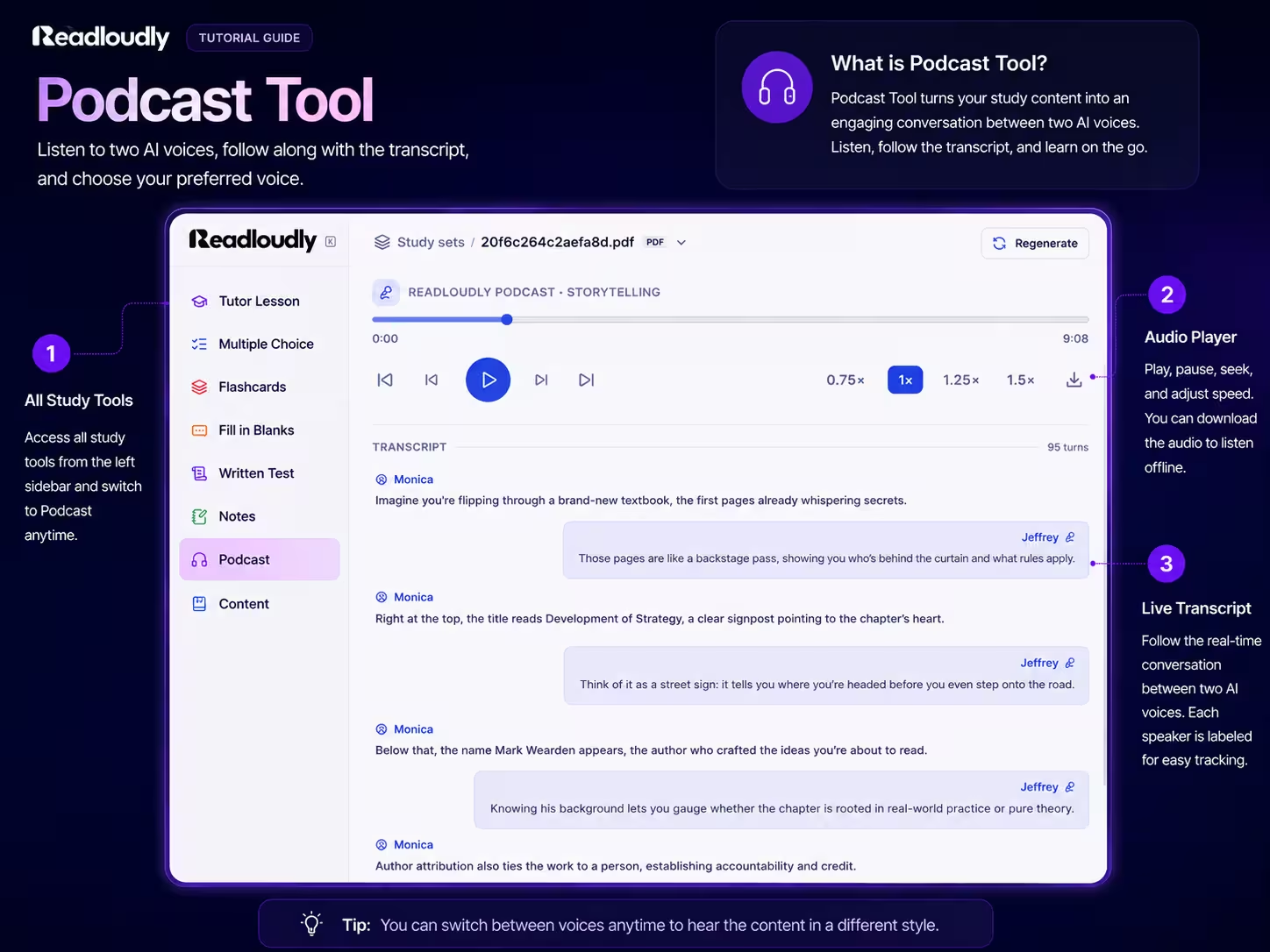
Podcast · Deep Dive
Episode ready · 7 min 48 s · 2 voices
What Makes It a Podcast
Reading Aloud Repeats the Chapter. A Podcast Talks It Through.
Text to speech gives you the page, word for word. The Podcast tool does something different — it writes a conversation about the page, so the questions you would have asked get asked, and answered, before you think of them.
Two Voices, One Chapter
Every episode has a host and a guest, each with a distinct premium voice you choose. The host keeps the discussion moving and asks the obvious questions; the guest explains, corrects, and adds the detail.
A Conversation, Not a Lecture
Dialogue is easier to follow than monologue when you cannot see the page. Ideas are introduced, questioned, restated, and tied back together the way they would be in a good tutorial.
Built From Your Material
The script is written from the document you uploaded, so the examples, the terminology, and the emphasis are the ones your course uses — not a generic explainer of the topic.
Host and Guest
The Questions Get Asked So You Do Not Have To
The host plays the student: what does this term mean, why does this step matter, is that really different from the last thing. The guest plays the tutor. Between them the chapter gets unpacked in the order a curious reader would actually want it.
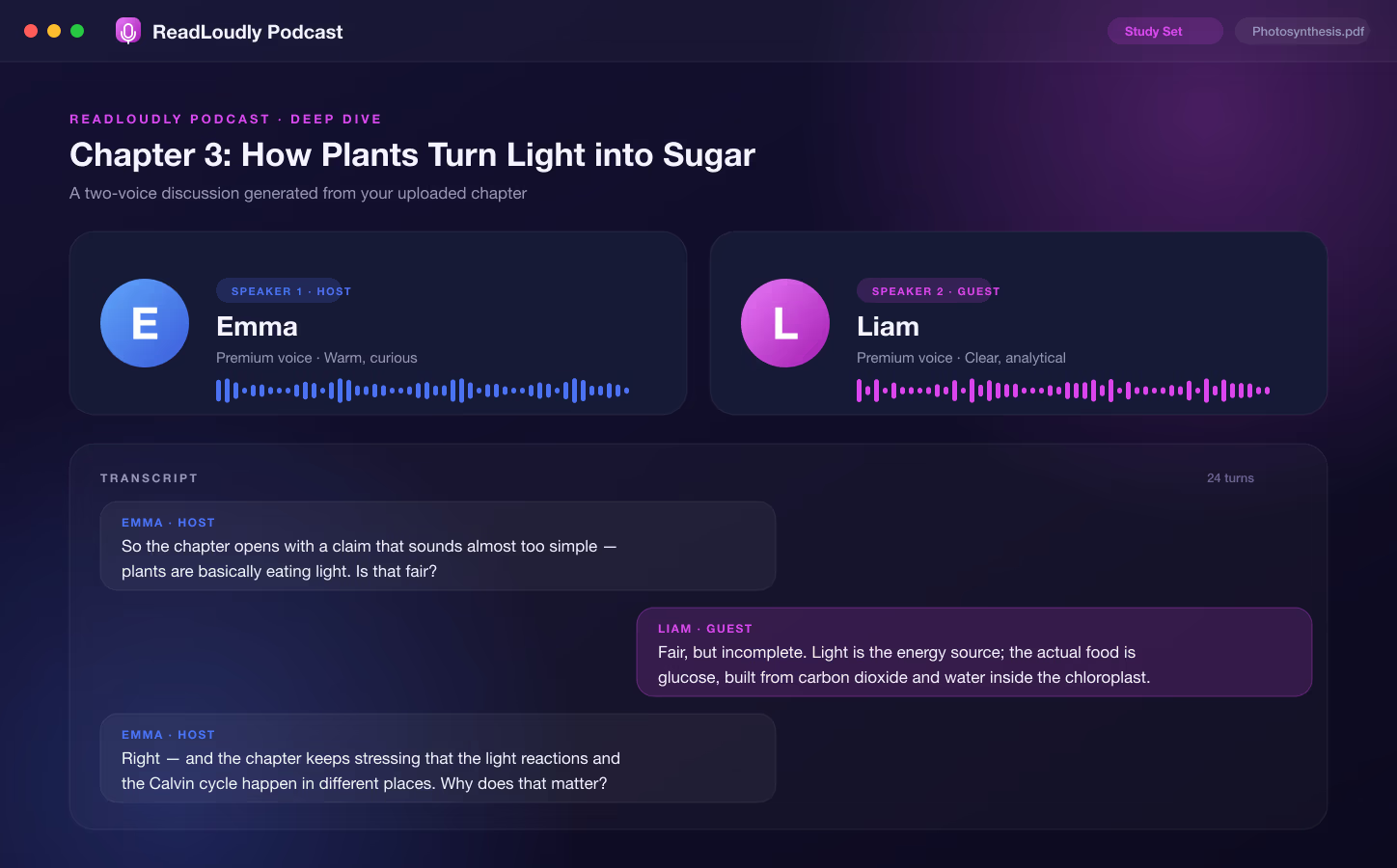
Always Know Who Is Asking
and Who Is Explaining.
You pick two different premium voices before the episode is written — one for Speaker 1, the host, and one for Speaker 2, the guest. Because the voices never blur into each other, the back-and-forth stays easy to follow even at 1.5x on a noisy train.
The Same Chapter,
Four Different Shows.
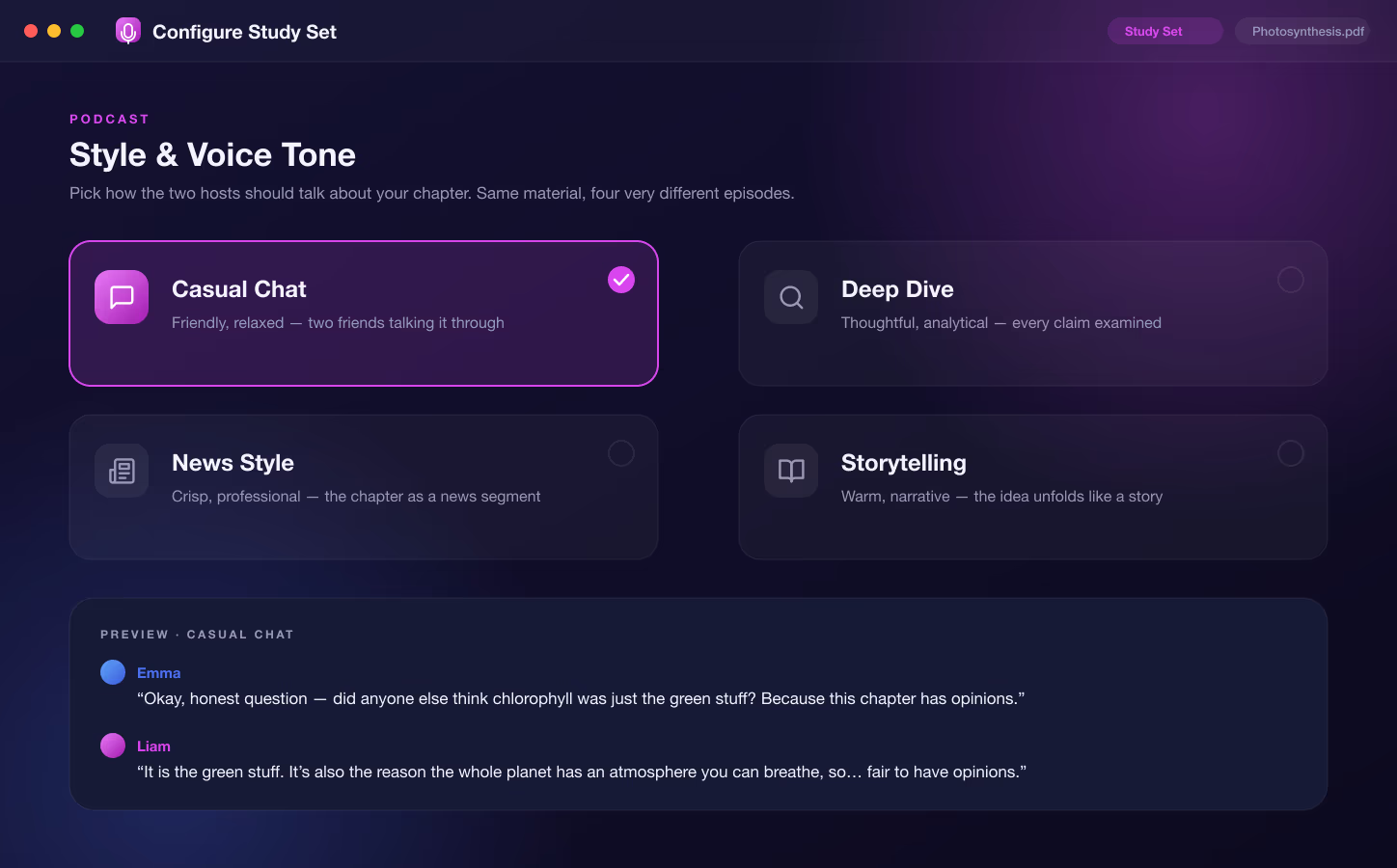
Before the script is written you choose how the hosts should talk. A first pass over unfamiliar material wants something relaxed; the night before an exam you might want every claim examined. The tone changes the whole episode, not just the greeting.
-
1
Casual Chat
Friendly and relaxed — two people talking a chapter through the way you would with a study partner.
-
2
Deep Dive
Thoughtful and analytical — the guest is pushed on the reasoning, not just the conclusions.
-
3
News Style
Crisp and professional — the chapter delivered as a segment, useful when you want the facts fast.
-
4
Storytelling
Warm and narrative — ideas unfold in sequence, which suits history, literature, and anything with a timeline.
As Short as a Recap,
As Long as a Walk-Through.
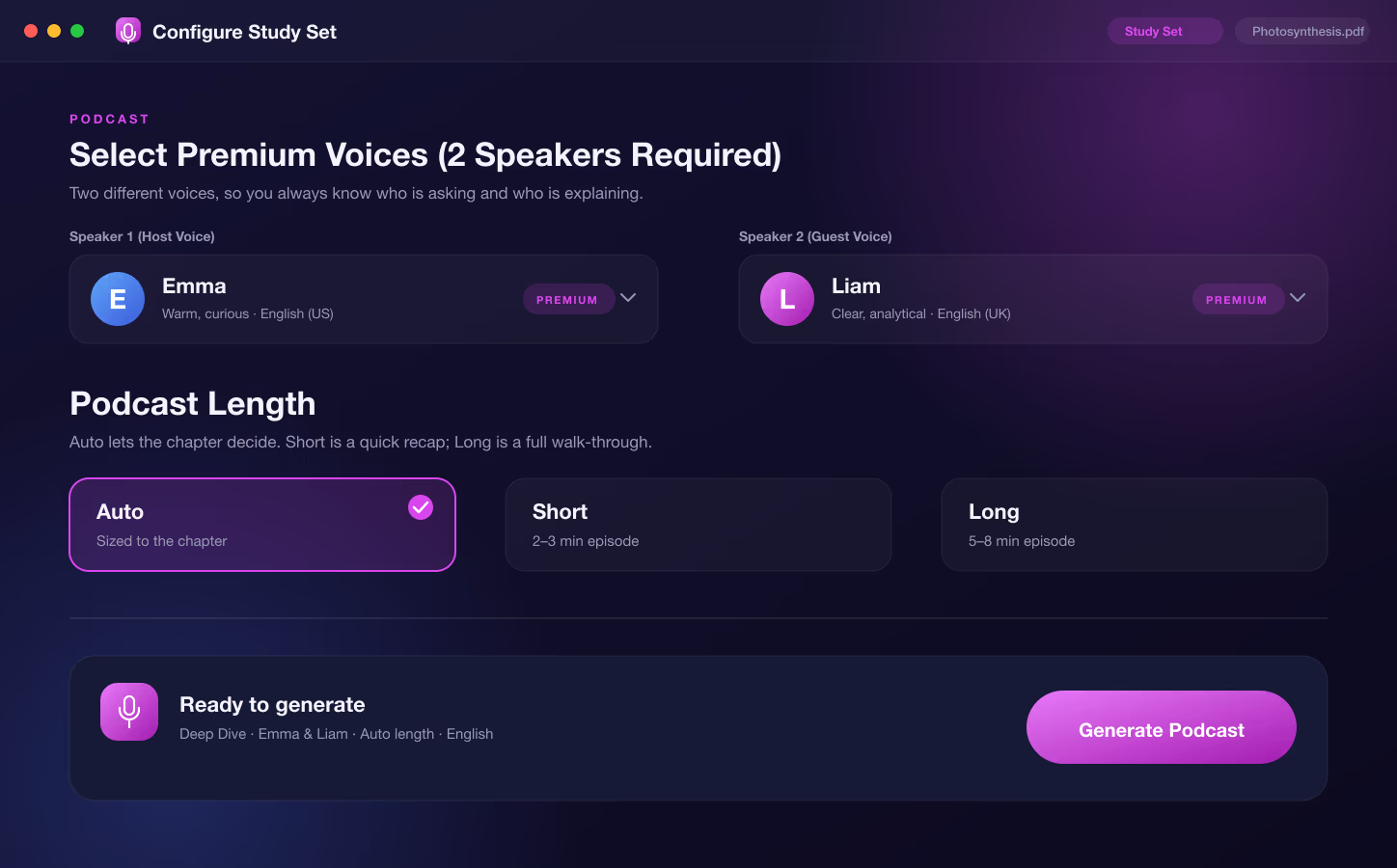
Two settings decide what the episode sounds like and how long it runs. Pick the host and guest from the premium voice library — the same natural voices behind the text to speech reader — then choose a length.
Auto
The default. Sizes the episode to the chapter, so a short section gets a short show and a dense one gets the time it needs.
Short · 2–3 minutes
A quick recap of the main ideas. Right for a chapter you have already read once and want to hear back.
Long · 5–8 minutes
A full walk-through with room for the examples and the edge cases. Right for material you are meeting for the first time.
The two speakers must be different voices — the app will not let you generate with the same voice twice, because a conversation you cannot tell apart is not a conversation.
Listen Your Way
A Player Built for Revision, Not Just Playback
The player stays pinned at the top while the transcript scrolls beneath it, so the controls are always within reach and the script is always there to check a line against.
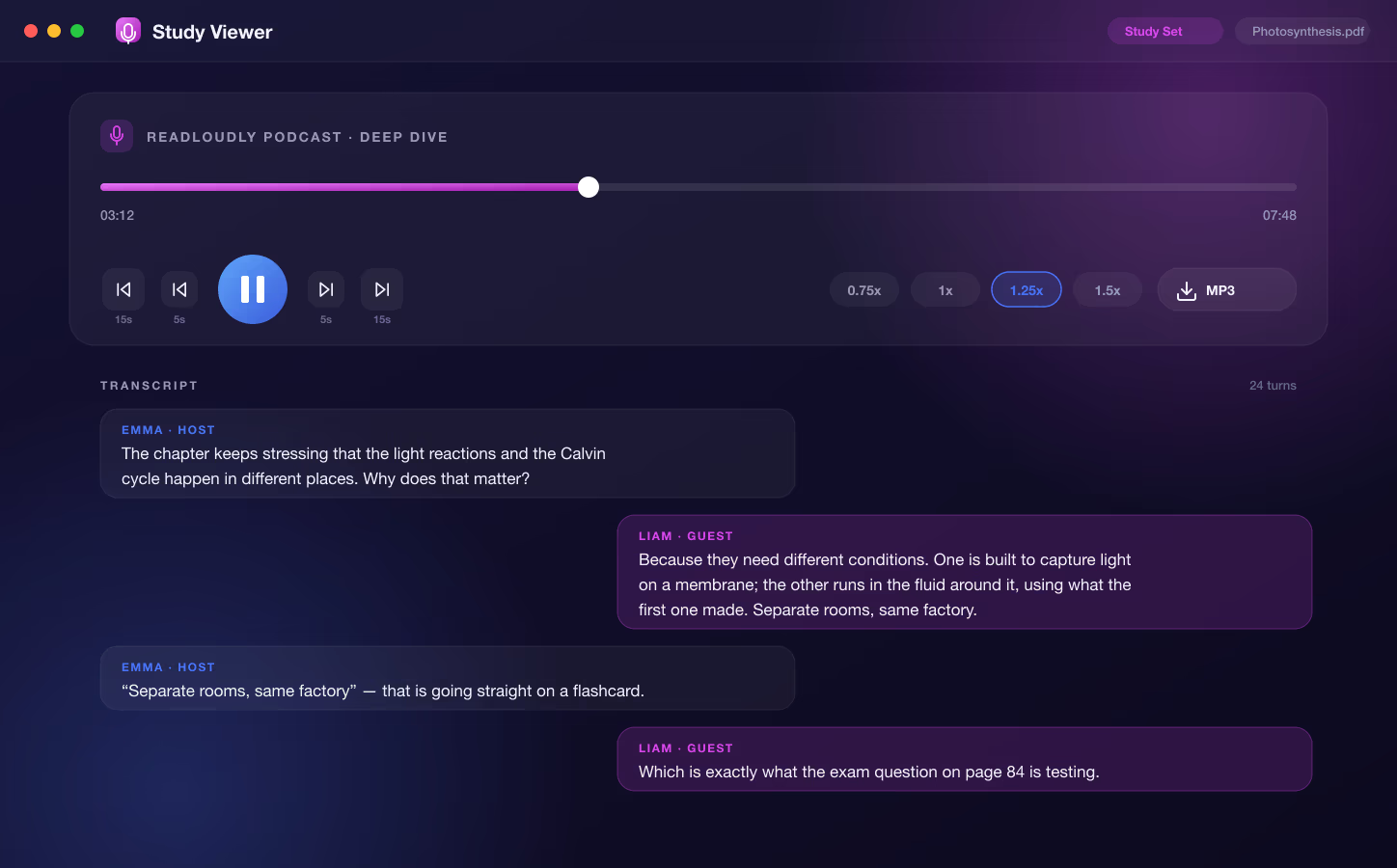
Listening for revision is not the same as listening for entertainment. You go back more, you speed up the parts you know, and you want to read the exact wording of a claim before you write it on a flashcard. The player is built around those habits.
-
Skip by 5 or 15 seconds
Jump back to catch a definition you half-heard, or forward past an aside, without scrubbing a timeline.
-
Speed from 0.75x to 1.5x
Slow down for a proof, push to 1.5x for a chapter you are hearing for the third time.
-
The full transcript, turn by turn
Every line of the script is on screen, labelled by speaker, so you can read a claim in the exact words before you note it down.
-
Download the MP3
One click saves the finished episode as an MP3 that plays in any music or podcast app, online or off.
Content
The original document, open beside the episode. When the guest cites a figure or a definition, the page it came from is one tab away.
Chat
Ask a question about anything the hosts said. The chat knows your document, so the answer comes from your chapter and not from the internet at large.
Notes
Your own writing, kept with the study set. Paste the line from the transcript that finally made something click and build your revision notes as you listen.
Study Time That Does Not
Need a Desk.
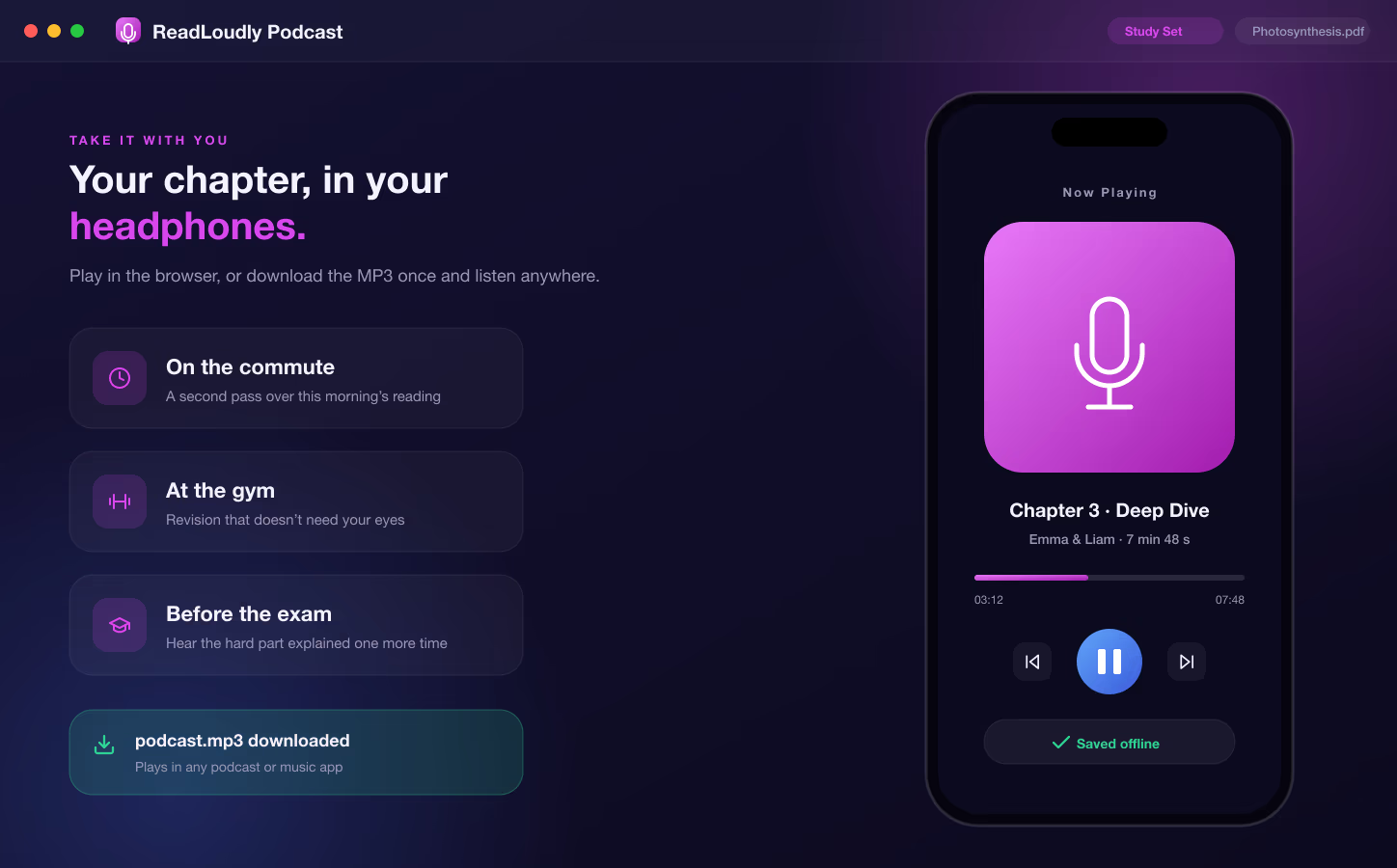
Most of the hours in a student's week are not spent at a desk — they are spent walking, commuting, queueing, and cooking. A podcast turns those hours into a second pass over the chapter you read this morning, which is exactly where spaced repetition earns its keep.
Use Cases
When a Study Podcast Is the Right Tool
The Commute You Already Have
Forty minutes each way is a chapter a day. Generate the episode the night before, download it, and the bus becomes the second read you never had time for.
The Chapter That Will Not Stick
When re-reading stops working, hearing two people argue about the same idea gives your memory a different hook. The Deep Dive tone is made for this.
Exam Week, Eyes Gone
After eight hours of reading, listening is the only revision left in you. A Short episode on each weak chapter is a low-effort last pass that still counts.
Readers Who Learn Better by Ear
For dyslexic and ADHD students, and anyone who follows a discussion more easily than a page, a two-voice episode is often the format that finally makes the material land.
Comprehension and Retention
Why Hearing It Discussed Beats Reading It Again
A third read of the same page mostly tells you that you recognise it. A conversation about the page forces the ideas into a new shape — and it is the reshaping that memory holds on to.
A Sensible Order
Tutor Lesson
Understand the chapter
Podcast
Hear it discussed, away from the desk
Flashcards
Drill the terms
Quiz & Written Test
Find the gaps
The podcast works best as a second pass. Read or be taught the chapter first, then let the hosts argue about it while you are doing something else.
-
1
Questions Are Retrieval Cues
Every time the host asks "so why does that matter?", you answer it in your head a beat before the guest does. That is retrieval practice, disguised as listening.
-
2
Spacing Without Scheduling
The value of a second pass depends on it happening hours later, not minutes. A downloaded episode gets listened to on the way home — the spacing takes care of itself.
-
3
Two Voices Are Easier to Follow Than One
A single narrator reading for eight minutes is easy to tune out. A change of speaker resets attention, and the handover between them marks where one idea ends and the next begins.
Works With
One Upload, the Whole Study Set
The Podcast is one of seven tools generated from the same document. Add the rest to the same study set whenever you are ready to be taught, drilled, or tested on it.
Tutor Lesson
Every chapter explained in plain prose with key points, then read aloud.
Multiple Choice
Practice questions with instant feedback and an explanation for every answer.
Flashcards
Term and concept cards for short, repeated recall sessions between lectures.
Notes
Editable summaries as a short recap, a detailed write-up, or a bullet outline.
How It Works
How to Make an AI Study Podcast in 3 Steps
Upload Your Chapter
Add a PDF, Word file, or EPUB to Study Hub — a textbook chapter, reading pack, or lecture handout.
Pick a Tone, Two Voices, and a Length
Select Podcast, choose Casual Chat, Deep Dive, News Style, or Storytelling, pick a host and guest voice, set the length, and generate.
Listen, Read, or Download
Press play in the study set, follow the transcript, or save the MP3 and take the episode with you.
Prefer a step-by-step walkthrough? Read the guide on how to turn a chapter or your notes into a podcast you can study from.
Frequently Asked Questions
Common questions about turning your own course material into an AI study podcast.
It is a short audio episode generated from your own document. ReadLoudly reads the chapter you upload, writes a conversation about it between a host and a guest, and voices each speaker with a different premium AI voice. You get the audio, a full transcript, and an MP3 download inside the same study set as your other tools.
Yes. You choose one voice for Speaker 1, the host, and a different voice for Speaker 2, the guest, from the premium voice library. The app will not generate with the same voice in both roles, so the two sides of the conversation are always easy to tell apart.
The whole script. Casual Chat is friendly and relaxed, Deep Dive is thoughtful and analytical, News Style is crisp and professional, and Storytelling is warm and narrative. The same chapter produces a noticeably different episode under each one, so it is worth picking the tone to match how you want to hear the material.
You choose. Auto sizes the episode to the chapter. Short gives you a two to three minute recap, and Long gives you a five to eight minute walk-through with room for the examples. Auto is the default and is the right pick when you are not sure.
Yes. Every finished episode has an MP3 download button in the player. The file plays in any music or podcast app, so you can save it to your phone and listen without a connection.
No. Podcast and Written Test are the two Study Hub tools that need a paid plan, because every episode is voiced line by line with premium voices. The Tutor Lesson, multiple choice, flashcards, fill in the blanks, and notes tools are all available on the free plan within the daily study set allowance.
Text-based PDF, Word (.docx), and EPUB files. Scanned or image-only PDFs are not supported, because the script is written from the text of the document and a page that is really a photograph has no text to work from.
Not sure which tone or length to pick?
Tell us the subject and when you plan to listen, and our team can suggest the setup that fits.
More Examples
Other Ways People Use ReadLoudly
Or start from the tools themselves — free AI study tools that turn one upload into a quiz, flashcards, notes and more.
AI Study Tools for Students
One upload becomes a full study set: quizzes, flashcards, notes, written tests, and a podcast.
AI Tutor for Students
Every chapter explained in plain prose, with key points and natural read-aloud audio.
AI Flashcards for Students
Any PDF or chapter turned into a deck of front-and-back cards you flip with a click or the space bar.
AI Quiz Generator for Students
A multiple choice quiz written from your own chapter, with instant feedback and an explanation for every answer.
Listen to Your Course Reading
Turn lecture notes, chapters, and handouts into natural audio you can revise with anywhere.
AI Tools for Researchers
Summarize and listen to academic PDFs so a heavy reading list stops being a bottleneck.
Turn Story Books into Audiobooks
Give any story a consistent AI narrator and listen to it as a finished audiobook.

Start listening smarter today
Join 4M+ readers who've transformed how they consume content. Turn any document into an engaging audio experience in seconds.