
How to Turn Your Notes and Slides Into a Practice Quiz That Actually Sticks
Quizzed content scored 92% on a unit exam against 79% for the same students' unquizzed content. An AI quiz generator makes that possible for every lecture, if you take the quiz first, read every explanation, and fix the questions the AI gets wrong. Here is the workflow, the evidence, and what the tools cost.
"Your lecture slides already contain every question on the exam. An AI quiz generator just asks them before the professor does."
An AI quiz generator turns your own notes or slides into a practice quiz in about a minute: upload the file, choose how many questions, and you get multiple-choice questions written from that document, each with one correct answer and a short explanation. That part is easy in 2026. The part that decides whether it improves your grade is what you do with the quiz, and that is what this guide is about.
The stakes are real. In a classic experiment, students predicted that rereading would give them the best long-term retention and that quizzing themselves would give them the worst. One week later, the group that had quizzed itself scored about 50% higher than the group that had built concept maps instead (Karpicke & Blunt, Science, 2011). Students are reliably wrong about what works. A quiz generated from your own material makes the effective thing the easy thing.
Key Takeaways
- Quizzing on course material raises exam scores: in a middle-school science class, quizzed content scored 92% on the unit exam versus 79% for the same students' unquizzed content, and a meta-analysis of real psychology courses found a d = 0.56 effect.
- Generating a quiz from your notes or slides takes four steps and about a minute: upload a text PDF, DOCX or EPUB, tick Multiple Choice, pick 5 to 20 questions, then answer with the 1 to 4 keys and read each explanation.
- Take the quiz before you read the chapter. Across five experiments, students who guessed first and then read remembered more than students given extra reading time instead, even though they got most pretest questions wrong.
- Feedback is the big lever: one week later, students who got feedback after a multiple-choice quiz recalled 60 to 70% versus 42% with none. Without it, wrong options can be learned as facts.
- Audit the AI's questions. In a real medical exam, 14% of AI-written questions had the wrong difficulty and 6% were factually wrong; after an expert edit pass, students could not tell AI items from human ones.
Part of our guide to how to study with AI in 2026. The quiz is one of seven outputs from the same upload; the PDF-to-flashcards guide covers its sibling.
Why a Quiz From Your Own Notes Beats Rereading Them
A quiz built from your notes works because it forces you to pull each fact out of memory, and each retrieval strengthens the next. Rereading the same notes feels smoother every pass, which is exactly why it fools you: fluency is not memory. This is the testing effect, and it has been measured in real classrooms, not only in labs.
The cleanest classroom demonstration quizzed eighth-grade science students on some of their unit content and not the rest. On the unit exam, quizzed material scored 92% against 79% for unquizzed material from the same students in the same class. The advantage was still there at the end of the semester (79% vs 72%) and at the end of the year (68% vs 62%) (McDaniel et al., Journal of Educational Psychology, 2011).
The pattern holds at university level. A meta-analysis limited to real psychology courses, 72 effect sizes across 19 publications, found testing improved learning outcomes with an effect size of d = 0.56 (Schwieren, Barenberg & Dutke, Psychology Learning & Teaching, 2017). And in the largest classroom synthesis, 222 studies covering 48,478 students, quizzing raised achievement with a medium effect of g = 0.50 (Yang et al., Psychological Bulletin, 2021).
Until recently the catch was that someone had to write the quiz, and many courses quiz only a few times a semester. An AI quiz generator that works from your own slides removes that limit: any lecture can be quizzed the same evening, and the questions stay tied to what your exam will actually cover rather than to a chatbot's general knowledge of the subject.
How to Generate a Quiz From Notes or Slides, Step by Step
The workflow below uses the Multiple Choice tool in ReadLoudly Study Hub, which is free within a daily allowance and generates from your uploaded document. The first three steps are the mechanics. Step four, and the sections that follow, are what turn a quiz into a grade.
Get your notes or slides into a text-based file
Export lecture slides to PDF (PowerPoint, Keynote and Google Slides all do this), save typed notes as DOCX, or use the textbook chapter's PDF or EPUB. The file needs real, selectable text: Study Hub rejects scanned or image-only PDFs at upload, because a photograph of a page has no text to write questions from. One lecture or one chapter per upload gives sharper questions than a whole-semester dump, since the generator spreads its questions across the document and a whole-semester file gets thin coverage.
Upload, tick Multiple Choice, choose a question count
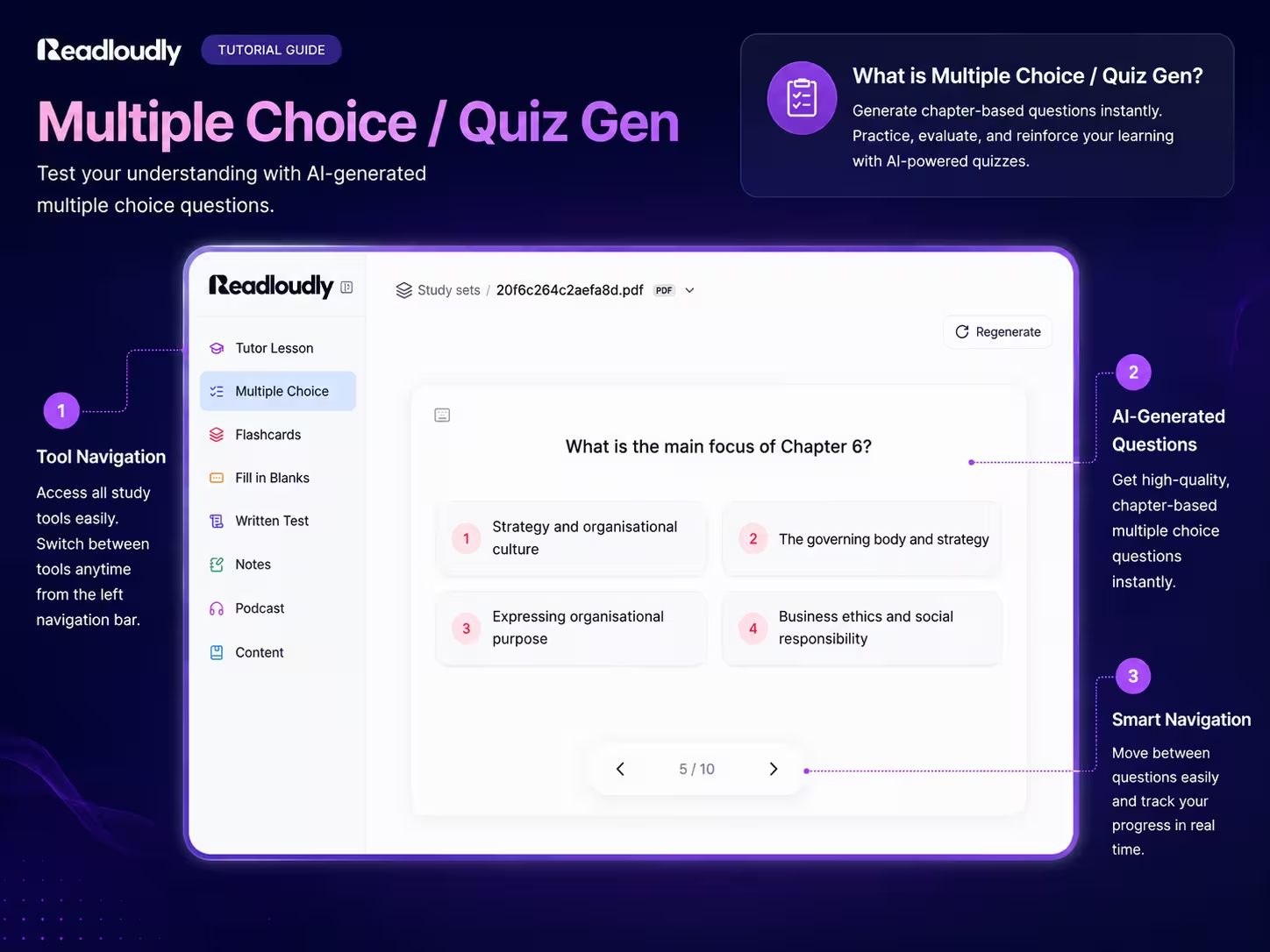
Open Study Hub, sign in (free), upload the file, and tick Multiple Choice on the configure screen. Choose 5, 10, 15 or 20 questions; ten suits a single lecture, twenty a dense chapter. That is the only setting. You can tick Flashcards in the same pass if you want a deck from the same upload.
Generate, then take it cold
Generation takes about a minute. Every question gets exactly four options, one correct answer, and a short explanation, and the generator is instructed to write only questions answerable from your document with no trick questions. Take the quiz before you reread anything: press 1 to 4 to pick an answer, Submit, read the explanation, then Enter for the next question. At the end you see how many you got right out of the total.
Audit the questions you missed against the source
The original document is one click away in the sidebar. For each miss, find the passage, check that the explanation matches it, and write one harder "why" or "what if" question of your own in the Notes panel. AI quizzes skew toward recall, and the section on what AI gets wrong explains why this two-minute pass matters more than a second attempt.
The quiz stays saved under the document, so you can retake it in a week or in exam month. On a paid plan, Regenerate writes a fresh set of questions from the same upload, which is how you get a second quiz on the chapter without uploading twice.
Take the Quiz Before You Read the Chapter
Generate the quiz from the slides before the lecture, or from the chapter before you read it, and take it first. Getting the answers wrong is the point. This is the pretesting effect, and it is one of the least-used findings in learning science because it feels backwards.
In the defining study, students either answered questions about an essay before reading it or received extra reading time instead. Only questions they had missed on the pretest were scored later. In all five experiments, the pretest group remembered more: 75% versus 56% in the first, 82% versus 64% in the third, 90% versus 63% in the fifth, and 55% versus 45% a full week later, despite pretest accuracy as low as 5% (Richland, Kornell & Kao, Journal of Experimental Psychology: Applied, 2009).
A larger follow-up with 1,573 participants compared quizzing before study against quizzing after it. Both beat no quiz at all, but pretesting produced higher overall scores, with an 18% advantage on tested questions after 48 hours, though only 1% on questions that had not been asked, so generate questions on everything you need to know (Pan & Sana, Journal of Experimental Psychology: Applied, 2021). The practical version: upload the slides the professor posted, generate ten questions, take them on the bus, then sit in the lecture already knowing which parts you cannot answer.
Read the Explanation Every Time: Why Feedback Matters
Never skip the explanation after a question, even one you got right. One of the largest factors in whether a multiple-choice quiz helps you is whether you see the correct answer afterwards, and the effect grows as the exam gets further away.
In the key experiment, students read short passages, took a multiple-choice test, and then received no feedback, immediate feedback, or delayed feedback. On a recall test one week later, the no-feedback group scored 42%; with immediate feedback, 60%; with delayed feedback, 70% (Butler, Karpicke & Roediger, Journal of Experimental Psychology: Applied, 2007). Any feedback was the big win, worth 18 to 28 points. Delaying it added a further edge.
There is also a specific danger in skipping feedback on multiple-choice quizzes. Plausible wrong options can be learned as facts. The same lab found that feedback, immediate or delayed, both raised correct answers and reduced the number of wrong quiz options that students later reproduced as answers (Butler & Roediger, Memory & Cognition, 2008). This is why every generated question in Study Hub carries a short explanation of the correct answer, and why the interface shows it before you can move to the next question.
Well-built multiple-choice questions have an upside that short-answer questions lack: when the wrong options are plausible, working out why they are wrong teaches you the related facts too. Students who took multiple-choice tests with competitive alternatives later recalled information about the incorrect options better than students who took cued-recall tests (Little, Bjork, Bjork & Angello, Psychological Science, 2012). Once you are scoring comfortably, though, retrieval without options is the harder and better workout; that is when to move to the Written Test tool (paid plan) or to answering each question aloud before looking at the choices.
What AI Gets Wrong in Quiz Questions, and How to Fix It in Two Minutes
AI-generated quiz questions are good enough to use and not good enough to trust blind. The best evidence comes from medical education, where AI questions have been run in real high-stakes exams and scored with the same psychometrics as human questions.
In one emergency-medicine exam, 100 questions written by GPT-4o were mixed with 100 written by human question-writers. Statistically the AI questions discriminated between strong and weak students about as well as the human ones. But blinded expert review found 6% of AI questions factually inaccurate (versus 4% of human ones), 6% irrelevant (versus 0%), and 14% pitched at an inappropriate difficulty (versus 1%). The AI questions also clustered at the "remember" and "understand" levels of Bloom's taxonomy, while human questions were more often "apply" and "analyze" (Law et al., BMC Medical Education, 2025).
Two later studies close the loop. When five leading models were asked for questions at specific Bloom's levels, only two consistently hit the requested levels; the other three were more accurate at the lower, recall-type levels (Nguyen et al., PLOS ONE, 2026). And when GPT-4o questions were reviewed by experts before being mixed into a blinded exam, 128 medical students and physicians identified the AI items with 49% accuracy, no better than chance, and the items showed no measurable difference in difficulty or discrimination (Linde et al., npj Digital Medicine, 2026). Reviewed AI questions performed as well as human ones in that exam. Unreviewed ones are a coin flip on difficulty.
Generating from your own document, as Study Hub does, removes most of the irrelevance problem, because every question must be answerable from your upload. It does not fix the recall skew. So run this audit on every quiz:
Does the explanation match the page it came from?
Open the source from the sidebar for any question that surprised you. An explanation that adds a detail the slides never state is the one to distrust, however confident it sounds.
Could you answer it by recognizing a word, or did you have to think?
If three of the four options were obviously wrong, the question is a recall check, not an exam rehearsal. Keep it, but do not let a high score on a deck of those fool you.
Write one "why" or "what if" question of your own for each topic you missed
Put it in the Notes panel beside the quiz. This is where the "apply" and "analyze" questions the AI skipped come from, and writing them is itself a form of retrieval practice. Answer them out loud on your next pass.
A Quiz Routine That Fits a Real Semester
Quizzing works best in small, repeated doses spread across the weeks before an exam, not as one long session the night before. The routine below costs about twenty-five minutes per lecture, most of it in time you would otherwise lose.
One lecture, four quiz sessions
- Before the lecture (5 min): upload the posted slides, generate 10 questions, take them cold. Expect to fail most of them. That is the pretest doing its job.
- Same evening (10 min): retake the quiz, read every explanation, run the two-minute audit, write your own "why" questions in Notes.
- Three days later (5 min): one more pass, answering each question aloud before looking at the options. Listen to the podcast version of the chapter on the commute first if you have one.
- Week before the exam (5 min per lecture): retake every lecture's quiz back to back, then generate a fresh set on the weakest chapters (Regenerate on a paid plan, or a new upload) so you are not just remembering the answers to the old one.
Pair the quiz with the other formats from the same upload rather than choosing between them. A quiz finds the gaps; the flashcard deck drills them in short daily reps; the audio version, through the textbook audio reader workflow, rebuilds familiarity in hours when you cannot read. If it is already the night before, our last-minute study guide compresses this into one evening.
What AI Quiz Generators Cost in 2026
Generating a quiz from your own notes should be free, and it is on ReadLoudly. Most rivals charge $9 to $25 a month for it or gate it behind small monthly allowances. These are the figures on official pricing pages and app listings when we checked on September 7, 2026; several vendors publish no numeric free-tier cap at all, so the table says so rather than guessing.
| Tool | Quiz from your own notes, free tier | Paid tier |
|---|---|---|
| ReadLoudly Study Hub | Yes, from PDF, DOCX or EPUB, within a daily allowance | $5/mo (ReadLoudly Core), all seven tools |
| Quizlet | Limited; numeric cap not published | Plus $9.99 and $44.99 tiers (iOS listing) |
| Knowt | Monthly AI limits; cap not published | $12.49/mo billed $149.99/yr, or $24.99/mo |
| Kahoot! | No AI generation on the free plan | Kahoot!+ from $3/mo billed $36/yr; $9 monthly |
| Quizgecko | First course free | Plus $9/mo billed $108/yr |
| Wayground (Quizizz) | 10 AI credits a month, 20 saved items | $12/mo billed $144/yr |
| StudyFetch | Limited; cap not published | $19.99/mo or $96/yr (iOS listing) |
An honest note on the competition: Kahoot! and Wayground are built for teachers running live quizzes in a room, and they are good at that. Quizlet's strength is its library of shared sets. What none of them do at $0 is generate a quiz from your own upload alongside flashcards, notes and a tutor from the same file, with the podcast and written test added on the $5 plan, which is the whole point of the document-to-study-set system. If you are on a budget, start with the $0 AI study stack and pay only when you hit a real limit; here is what ReadLoudly Core adds when you do.
ReadLoudly tools: Study Hub · Multiple Choice · Flashcards · Text to Speech
Start With Tomorrow's Lecture
Find the slides for your next lecture, upload them tonight, generate ten questions, and take them before you walk in. You will get most of them wrong, and that is the best possible preparation: the lecture will land on questions your brain is already holding open. Retake the quiz that evening with the explanations, write two questions of your own, and you have run pretesting, retrieval practice and feedback on one lecture in under twenty minutes.
The students who gain the most from an AI quiz generator are not the ones who generate the most quizzes. They are the ones who take the quiz first, read every explanation, fix the questions the AI got wrong, and come back three days later. The generator handles the part that used to need a teacher. The rest is a habit that takes a week to build.
Take the quiz before the professor asks the questions
Upload one PDF, DOCX or EPUB, tick Multiple Choice, and have 5 to 20 questions with explanations in about a minute. Free to start, no credit card, and the paid plan is $5, not $20.
Generate a Quiz From My Notes